Best AI Video Generator for Consistent Characters | 7 Ranked
Quick Summary
- Keeping the same character face, body, and clothing across multiple AI video scenes remains one of the hardest problems in text to video generation, and each major tool solves it differently.
- Seedance 2.5 and Kling 3.0 lead the category with multi-reference systems and native multi-shot storyboarding, while Runway Gen-4.5 and Veo 3.1 offer strong single-reference consistency for shorter clips.
- Neural4D runs five frontier video models, including Seedance 2.0, Kling 3.0, and Veo 3.1, from one interface with a shared credit pool, so you can match the model to each shot instead of committing to one tool.
You spend hours crafting the perfect character prompt, only to see a completely different face in the next scene. That is the character consistency problem in AI video generation, and it is one of the main barriers between a test clip and a real production. If you are looking for the best AI video generator for consistent characters, this guide compares seven video generators on five weighted criteria so you can pick the one that actually keeps your character looking the same from shot one to shot thirty. Every tool here produces video on its own, so each one in the ranking is a generator you can actually run.
Comparison Table: 7 AI Video Generators Ranked
Existing comparison articles rank tools by general video quality. We narrowed the focus to one question: how well does each tool keep a character looking the same across multiple scenes? To identify the best AI video generator for consistent characters, we scored seven video generators across five weighted criteria. We assessed each tool as a standalone product, not as a model that a multi-model platform happens to offer.
| Tool | Best For | Consistency Mechanism | Reference / Continuity Input | Score |
|---|---|---|---|---|
| 1. Seedance 2.5 (ByteDance) | Multi-entity storytelling | Multi-reference conditioning with a six-part prompt structure | 30 images + 10 video clips + 10 audio clips | 89/100 |
| 2. Kling 3.0 | Speed on a budget | Multi-shot storyboarding plus Voice Binding | Multi-shot continuity plus character reference | 82/100 |
| 3. Runway Gen-4.5 | Creative control | Act-Two performance transfer and reusable Characters assets | Single reference image | 78/100 |
| 4. Veo 3.1 (Google DeepMind) | Cinematic single-character shots | Ingredients to Video reference conditioning | Multiple reference images | 76/100 |
| 5. Vidu (Shengshu Technology) | Multi-entity reference | Reference-to-video with several simultaneous entities | Up to 7 character or product references | 73/100 |
| 6. Pika 2.5 | Fast iteration | Reference image guidance plus Pikaframes keyframe transitions | Single reference image | 64/100 |
| 7. LongStories.ai | Long-form narrative | Universe system reusing cast, style, and voices automatically | Defined once, reused across every scene | 62/100 |
Each tool received a score of 1 to 10 per criterion. The weighted total determines the final rank.
| Criteria | Weight | Why It Matters |
|---|---|---|
| Single-Character Consistency | 25% | Core keyword need: one face, same across scenes |
| Multi-Entity Consistency | 20% | Two or more characters staying distinct in the same video |
| Temporal Stability | 20% | Identity holds from second 1 to second 30+ |
| Prompt Adherence and Control | 15% | How precisely you can guide identity via references |
| Output Quality and Speed | 20% | Resolution, artifacts, and generation time |
How these scores work: Each criterion was scored 1 to 10 and weighted to a total out of 100, as of September 2026. The scores are an editorial assessment based on each tool’s documented reference capacity, published model specifications, and hands-on use, not a controlled head-to-head benchmark. Model behavior changes as vendors ship updates, so treat the ranking as a starting point and confirm current performance before you commit to a tool.
Table of Contents
- Comparison Table: 7 AI Video Generators Ranked
- Part 1: The 7 Best AI Video Generators for Consistent Characters HOT
- Part 2: Why Character Consistency Matters in AI Video
- Part 3: Quick-Start Tutorial: Creating Your First Consistent Character Video
- Part 4: Where Neural4D Fits in the AI Video Landscape
- Part 5: Common Questions on AI Video Character Consistency
- Conclusion: Choose Your Tool and Start Creating
Part 1: The 7 Best AI Video Generators for Consistent Characters
1. Seedance 2.5 (ByteDance) – Best for Multi-Entity Storytelling Score: 89/100
Seedance 2.5 accepts up to 30 reference images, 10 video clips, and 10 audio clips in a single generation, the widest reference capacity in this comparison, to anchor character appearance, brand colors, and style, as documented in the ByteDance Seed announcement. This makes it the strongest option in this comparison for multi-entity consistency: you can upload reference sheets for two different characters and generate scenes where both maintain their identity simultaneously. The six-part prompt structure (Subject, Action, Camera, Lighting, Style, Audio) gives precise control over every generation variable. If consistency across multiple characters is your priority, Seedance 2.5 is the best AI video generator for consistent characters in multi-entity scenarios. Neural4D offers Seedance 2.0 as one of five video models inside its AI video generator, accepting up to 9 reference images, 3 video clips, and 3 audio clips, alongside Veo 3.1, Grok Imagine, Seedance 2.0 Fast, and Kling 3.0. For a deeper look at settings that work, read our Seedance 2.5 review.
2. Kling 3.0 – Best for Speed and Single-Character Work Score: 82/100
Kling 3.0 offers multi-shot storyboarding with up to six shots per generation, per the Kling multi-shot guide, and Voice Binding that locks a unique voice to each character so they not only look the same but sound the same across different videos, scenes, and shots. At roughly six credits per video, it is among the cheapest premium options for character-driven content. Weakness: multi-entity scenes show measurable drift when two characters physically interact in close-up frames.
3. Runway Gen-4.5 – Best for Creative Control Score: 78/100
Runway’s Act-Two feature drives character performance from a reference video, and its Characters product turns a person into a reusable asset. Runway documents an explicit tradeoff here: lower expressiveness settings improve character consistency. A single reference image as an identity anchor at generation time works well for short multi-shot narratives up to 16 seconds. No native audio output, which means separate audio sync is required for dialogue scenes. For alternatives that prioritize consistency differently, see our comparison of best Sora alternatives.
4. Veo 3.1 (Google DeepMind) – Best for Cinematic Single-Character Consistency Score: 76/100
Veo 3.1’s “Ingredients to Video” system accepts up to 3 reference images of a character, object, or scene to maintain character appearance across a scene. It supports up to 4K output, the highest resolution in this comparison. If cinematic quality is your priority, Veo 3.1 competes as a top-tier AI video generator for consistent characters in short-form hero shots. Tradeoff: clips are limited to 6-8 seconds, which makes long-form continuity harder to achieve without manual bridging.
5. Vidu (Shengshu Technology) – Best for Multi-Entity Reference Score: 73/100
Vidu is built specifically for multi-entity reference-to-video: upload up to seven character or product references and keep them all consistent in one scene. Along with Seedance, Vidu handles multi-character scenes more reliably than the other tools here. Best suited for animated and stylized content rather than photorealism.
6. Pika 2.5 – Best for Fast Iteration Score: 64/100
Pika 2.5 is designed for viral effects and short-form social content with reference image guidance and Pikaframes for keyframe transitions. Character consistency is not a core strength: identity drift appears within five seconds on most multi-shot sequences. Best treated as an effects tool rather than a character-driven narrative platform.
7. LongStories.ai – Best for Narrative Sequence Generation Score: 62/100
LongStories.ai uses a “Universe” system where you define cast, style, and voices once, then the system reuses them automatically across all scenes and future videos. Purpose-built for long-form content of five minutes or more. Character consistency is stronger than average for episodic work but individual clip quality lags behind Seedance and Kling.
Five Models, One Workspace
Run Seedance, Veo, Kling, and Grok Imagine on the same character without separate subscriptions. No setup, no training time.
Free plan includes 50 Power per week. No credit card required.
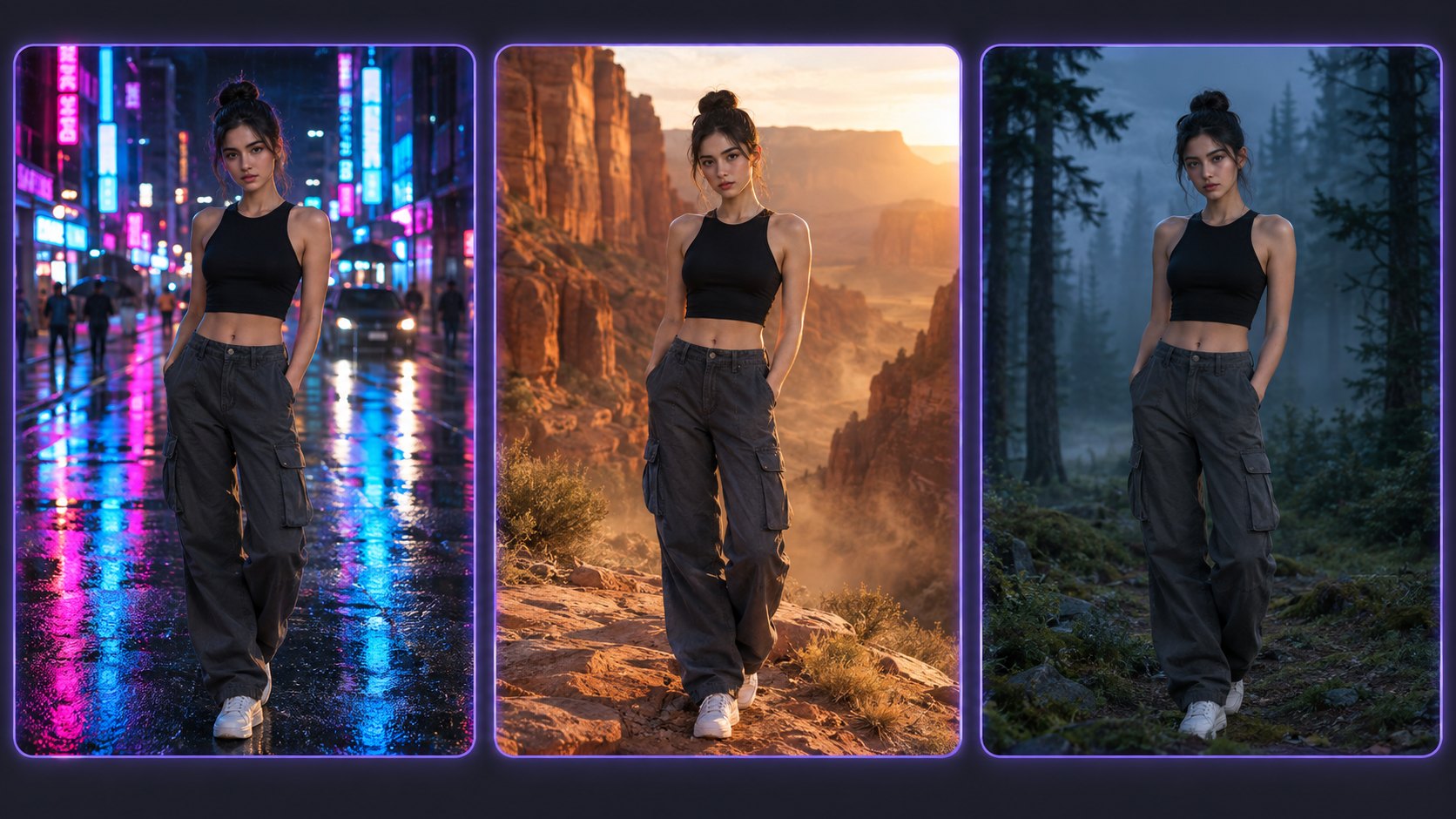
Part 2: Why Character Consistency Matters in AI Video
Most AI video generation workflows treat separate generations as independent unless the platform provides reference conditioning, reusable character assets, or project-level identity controls. In a text-only workflow, when you type “a young woman with brown hair and a red jacket” into two separate prompts, the model reinterprets those words from scratch each time. The result is two different people wearing vaguely similar clothes.
This is not a minor quality issue. It is a structural limitation of how diffusion-based video models work. The Face Consistency Benchmark (Podstawski, Kudelska, and Wang, 2025) scored leading models by the cosine distance of facial embeddings against real-video baselines. HunyuanVideo and Runway Gen-3 performed better than the rest of the field, and the authors still concluded that both “fall significantly short of real video.” The core tradeoff is that self-attention features in video models encode both motion and identity simultaneously. Constraining one overconstrains the other.
For content creators making short films, product demos, or social media series, an inconsistent character breaks suspension of disbelief. Viewers notice when a face shifts between cuts. Brands notice when their spokesperson changes appearance from one ad to the next. The best AI video generator for consistent characters is the one that moves beyond text-only prompts and gives you visual anchors to lock identity across every scene.
Part 3: Quick-Start Tutorial: Creating Your First Consistent Character Video
Getting consistent characters does not require complex training. Follow this three-step workflow that works across Seedance, Kling, and Runway. Each tool approaches consistency differently, but the best AI video generator for consistent characters will support all three of these steps natively.
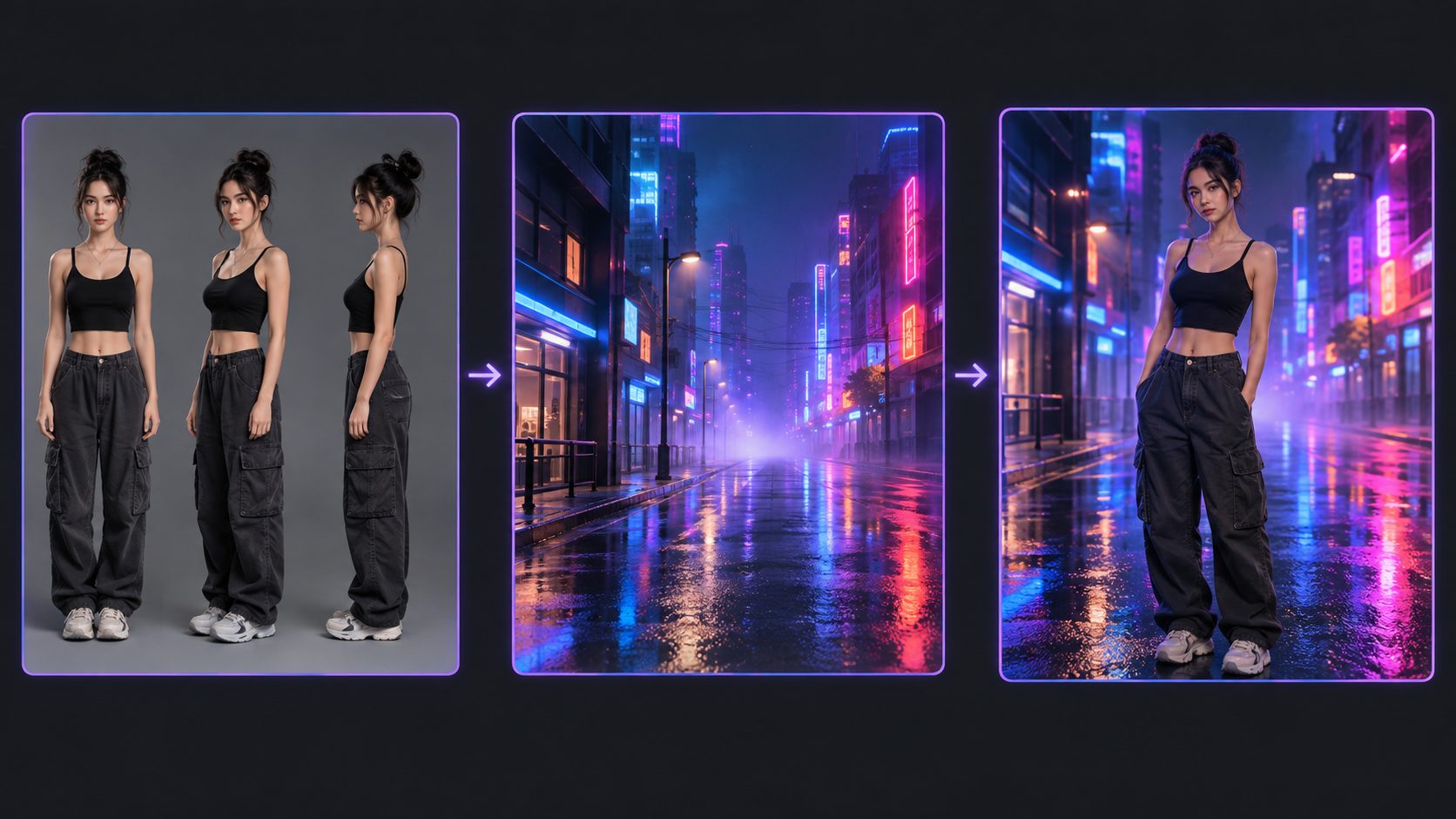
Step 1: Build a character reference sheet. Generate a front-facing portrait, a 3/4 angle view, and a profile view of your character with consistent clothing, lighting, and background. Use the same prompt formula for each: [view] + [age and gender] + [key physical traits] + [clothing] + [background] + [style]. Save all three images as your visual anchor set.
Step 2: Generate the scene environment first. Write a prompt describing the setting, lighting, and camera movement without specifying the character. Let the AI build the background independently. This avoids the common failure mode where the model tries to composite character and environment simultaneously and distorts both.
Step 3: Swap your character into the scene. Use the tool’s reference-to-video feature and upload your character sheet. Keep the character description in the prompt short and consistent. If you are new to this workflow, start with our guide on how to use text to video in Neural4D Studio for a walkthrough of the interface and settings.
Part 4: Where Neural4D Fits in the AI Video Landscape
Every tool above asks you to bet on one model. Neural4D takes the opposite approach: its Video Generation feature runs five frontier models in a single interface, Seedance 2.0, Veo 3.1, Grok Imagine, Seedance 2.0 Fast, and Kling 3.0, under one credit pool. That changes how you handle consistency. You are not locked into one model’s weak spots, because you can route each shot to whichever model handles it best while keeping the same character reference: a hero close-up to Veo 3.1 for its cinematic rendering, a fast draft to Seedance 2.0 Fast, a longer dialogue beat to Kling 3.0. Duration limits and resolution differ by model rather than being fixed platform-wide. For sellers who need AI video from text for e-commerce, that means one consistent brand spokesperson across a product line without switching tools between clips.
| Video Model in Neural4D | Also Best Known As | 4K Output |
|---|---|---|
| Seedance 2.0 | Multi-reference video generation | Yes |
| Kling 3.0 | Multi-shot storyboarding with Voice Binding | Yes |
| Veo 3.1 | Cinematic single-character shots | Yes |
| Seedance 2.0 Fast | Faster iteration at lower cost | No |
| Grok Imagine | Stylized and experimental looks | No |
Reference depth is what separates this class of tool from text-only prompting. Seedance 2.5 accepts up to 30 images plus reference video and audio clips in one pass, enough to upload a full character style guide. The version of Seedance available in Neural4D, Seedance 2.0, accepts up to 9 images, 3 video clips, and 3 audio clips per generation, and across the five models the mix of modalities is the point: tools that accept still images only can capture a face but not a walk cycle or a voice.
Part 5: Common Questions on AI Video Character Consistency
Q: How to get consistent characters in AI videos?
The most reliable method is creating a multi-angle character reference sheet (front, 3/4, profile) and uploading it as a reference in every generation. Text-only prompts produce a new interpretation each time. Tools like Seedance 2.5, Kling 3.0, and Runway Gen-4.5 all support reference image conditioning. For the strongest lock, a trained identity model beats reference conditioning, though training consumes 20 or more images per character and several minutes of setup time before it produces anything. The best AI video generator for consistent characters will depend on how many references your workflow requires.
Q: Which AI can create consistent characters across multiple scenes?
Seedance 2.5 and Kling 3.0 lead for multi-shot consistency. Seedance 2.5 accepts up to 30 reference images plus 10 video and 10 audio clips, and handles multi-entity scenes where two characters must remain distinct. Kling 3.0 supports up to six camera cuts per generation with automatic identity continuity across cuts. Runway Gen-4.5 is strong for shorter sequences up to 16 seconds but lacks native multi-shot storyboarding. For episodic content exceeding five minutes, LongStories.ai’s Universe system automates consistency across an entire project.
Q: What is the most reliable AI video generator for character identity?
Based on our weighted scoring of five criteria, Seedance 2.5 (89/100) ranks highest overall, driven by its reference depth and multi-entity capability. Kling 3.0 (82/100) scores highest for budget-constrained projects where single-character consistency is sufficient. Runway Gen-4.5 (78/100) works best for filmmakers who need granular control over motion and camera while keeping a single character consistent. The right answer depends on whether you need multi-character scenes, the length of your project, and your budget.
Q: Can I use two different characters in the same AI video without them mixing?
Yes, but only with tools that support multi-entity reference conditioning. Seedance 2.5 and Vidu handle multi-entity scenes most reliably in this comparison, keeping two characters distinct in the same scene. Kling 3.0 can handle multi-character scenes but shows identity drift when characters physically interact in close-up frames. In all cases, make the two characters visually distinct with different hair colors, clothing styles, and body types. Identical twins in different outfits remain difficult for every model tested here.
Q: Does Seedance 2.5 support character reference images?
Yes. Seedance 2.5 accepts up to 30 reference images plus 10 video clips and 10 audio clips. For character consistency, upload three to five stills of your character from different angles as the reference set. The model uses these to lock face, hair, clothing, and body proportions across all generated scenes. Neural4D runs Seedance 2.0 among five video models in its text to video feature, with the same multi-reference approach and one credit pool covering all of them. For detailed settings, refer to the Seedance 2.5 feature page.
Q: What is the best free AI video generator for consistent characters?
Kling 3.0 and Vidu are two options worth testing if you want to start with a free tier. Kling 3.0 pairs a free credit allotment with multi-shot storyboarding, and Vidu supports multi-entity reference, which makes it a strong option for animated content. Most free plans apply watermarks, limit resolution to 720p, or restrict commercial use. If you want to test before committing, Neural4D’s free plan includes 50 Power per week for trying the best AI video generator for consistent characters in real projects.
Q: How do I avoid character drift in long-form AI videos?
Character drift increases with clip count, not clip length. The solution is a two-part strategy. First, use the same set of reference images for every single generation in your project. Changing references between clips introduces inconsistency. Second, use the output of each generation as the starting frame for the next scene when your tool supports frame conditioning. This technique, called temporal bridging, preserves motion vectors and subject orientation across cuts. For projects exceeding 30 seconds, plan transition shots (B-roll, wide angles, cutaway objects) at points where drift is most likely to accumulate.
Q: Which AI video generator is best for e-commerce product videos with a spokesperson?
Seedance 2.5 is a strong choice for spokesperson videos because its multi-reference system keeps a real person’s face consistent across multiple product shots. Upload three to five reference images of the spokesperson and include product shots as additional references. Kling 3.0 works well for budget-conscious e-commerce teams but requires careful reference management to avoid product detail drift. For Amazon listing videos where the spokesperson is less important than the product itself, Runway Gen-4.5’s single-reference system is often sufficient and faster to set up. Neural4D covers this use case across five models in one interface, so you can test Kling 3.0 and Veo 3.1 against Seedance 2.0 without paying for separate subscriptions.
Ready to Build Consistent Characters?
Pick from five AI video models in one workspace and see the difference that multi-reference consistency makes.
Free plan includes 50 Power per week. Upgrade to Pro for faster generation and higher resolution.
Conclusion: Choose Your Tool and Start Creating
Character consistency is not a feature checkbox. It is a fundamental architectural constraint of AI video models. The tools that solve it best are the ones that give you visual anchors, multiple reference slots, and multi-shot storyboarding. Seedance 2.5 scores highest in our decision matrix as the best AI video generator for consistent characters because it combines deep reference capacity with multi-entity support and temporal stability across those references. Neural4D takes a different route: rather than betting on a single model, it runs five in one interface under a shared credit pool, so you can put the strongest model on the shots that need it and a faster one everywhere else.
If your priority is speed on a budget, Kling 3.0 delivers 80% of the consistency at a fraction of the cost per clip. If you need cinematic quality for hero shots, Veo 3.1 works best in the 6 to 8 second range, where rendering quality matters more than long-sequence continuity. And if you are building a long-running episodic series, LongStories.ai’s Universe system reduces the manual overhead of managing references across dozens of clips.
No tool is perfect. Every model in this comparison shows some degree of identity drift on clips longer than 30 seconds, and multi-character interaction remains the hardest problem in this comparison. But the gap between a test clip and a production-ready consistent character video is narrowing fast. Pick the tool that matches your use case, build a good reference sheet, and start creating.