How to Create Video with AI from Text: E-commerce Guide 2026
Quick Summary
- Write a product-focused text prompt covering subject, action, style, and platform specs to get consistent AI video output.
- Control aspect ratio (9:16 for Reels/TikTok, 1:1 for feed), video length (6-15s for ads), and format (MP4) before generating.
- Neural4D’s text-to-video feature generates product videos directly from your prompt, no footage or editing software required.
- The content gap is real: all top SERP results for this topic are tool landing pages, not tutorials. This guide fills it.
- Review the generated preview and regenerate with an adjusted prompt if framing or lighting needs correction.
Create video with AI from a text prompt in under two minutes. Whether you’re running ads on TikTok, populating your Shopify product page, or building out Instagram Reels content, the bottleneck is no longer equipment or editing skills. It’s knowing how to write a prompt that actually works and how to configure your output specs correctly before you hit Generate.
Table of Contents
- Part 1: Why Text Prompts Are the New Product Video Brief
- Part 2: Writing the Perfect Prompt for Product Videos
- Part 3: Controlling Visual Style and Output Specs
- Part 4: The Neural4D Workflow: Text to Video, Step by Step
- Part 5: Neural4D vs. Canva, InVideo, and CapCut for E-commerce
- Part 6: FAQ on Creating AI Videos for Your Store
- Start Creating High-Converting Product Videos Today
Part 1: Why Text Prompts Are the New Product Video Brief
Product video used to follow a specific script: hire a photographer, book a studio, source props, shoot, edit. The minimum viable version took two to three days. The result was a 15-second clip.
Text-to-video AI collapses that workflow. You describe the shot. The model generates it. The ability to make video with AI from a text brief, no footage required, is why this matters for e-commerce specifically: platforms like TikTok Shop and Instagram Reels now prioritize short video over static images in both the algorithm and conversion data. Brands that can produce video content at speed win more placement.
📊 The global AI video generation market was valued at $554.9 million in 2024 and is projected to grow at a CAGR of 36.5% through 2030, driven by e-commerce demand for scalable visual content. (Precedence Research, 2024)
The specific shift in 2026 is that text-prompt quality now determines output quality more than the tool itself. Two sellers using the same platform can produce radically different results based on how they describe their shot. A vague prompt generates a generic clip. A structured product prompt generates something you can actually use in a paid ad.
That’s what this guide covers: how to write structured prompts, configure specs, and run the full workflow to create video with AI, from blank prompt field to exported MP4.
Part 2: Writing the Perfect Prompt for Product Videos
The most common mistake e-commerce sellers make when they create video with AI is treating the prompt like a search query. “Skincare product video” is a search. It is not a prompt. A prompt is a shot description.
The Product Prompt Formula
Every effective product video prompt has four components, in order:
- Subject: What is in frame. Be specific. Not “moisturizer” but “a minimalist white glass jar of facial moisturizer on a white marble surface.”
- Action or motion: What moves and how. “A slow 360-degree rotating camera orbit” or “subtle light rays shifting across the product.” Static scenes look flat in video.
- Lighting and mood: “Soft studio lighting with a warm highlight on the lid” vs. “dramatic low-key side lighting for a premium look.” This sets the ad tone.
- Platform context: “Vertical 9:16 TikTok-style close-up” vs. “square 1:1 Instagram feed product shot.” Include this in the prompt itself, not just in the settings.
Assembled example for a supplement brand: “Close-up of a dark amber glass supplement bottle on a slate surface, a slow forward push on the camera, soft cool backlighting with a sharp specular highlight on the cap, vertical 9:16 frame, clean minimal dark background, premium health brand aesthetic.”
That prompt gives the model enough structure to generate something consistent. You’re not describing the editing style or the post-production look. You’re describing a physical camera setup as if you were briefing a cinematographer.
E-commerce Prompt Patterns That Work
For social ad creatives, three patterns generate reliably strong output. Orbit shots (slow camera rotation around a product) work well for Shopify product pages and Reels. Hero reveals (product emerges from abstract environment) work for TikTok cold traffic. Texture close-ups (macro detail of material, fabric, or surface) work for fashion and skincare.
For TikTok product content, the most reliable pattern is a product reveal: start tight on the product, pull back slowly, end on a clean background. It gives the algorithm a clear subject to index and gives viewers enough time to register the product before the loop restarts.
Part 3: Controlling Visual Style and Output Specs
Getting the prompt right is half the work. The other half is configuring the output correctly before generation. Generating a 16:9 clip for TikTok is not a minor mistake. You’ll get pillarboxing, cropped subjects, or a video the platform’s algorithm penalizes as non-native format.
Aspect Ratio by Platform
The spec that matters most for e-commerce content is aspect ratio. 9:16 is the native format for TikTok, Instagram Reels, and YouTube Shorts. 1:1 works for Instagram feed posts and Shopify product galleries. 16:9 is for YouTube and presentation decks, not for mobile-first paid social. Set this before you generate, not as a crop in post. Post-cropping a 16:9 generation to 9:16 will cut your subject out of frame.
Video Length for Product Ads
The practical range for AI product video content is 6 to 15 seconds. Six-second clips work for TikTok pre-roll and Meta retargeting. Twelve to 15 seconds gives you enough runtime to show product detail and motion without losing viewer retention. Anything over 20 seconds needs scripted narrative structure, which is a different production format.
Output Format and Export
MP4 with H.264 encoding is the universal safe choice for every e-commerce platform. If the tool gives you a choice, take 1080p at minimum. For Shopify product page embeds, 1080p at 9:16 or 1:1 plays without format conversion. For paid social, most ad platforms accept 1080p MP4 directly.
Size 1080×1920
Length 9–15s
Format MP4
Size 1080×1920
Length 7–15s
Format MP4
Size 1080p
Length 10–30s
Format MP4
For brands building a repeatable workflow to create video with AI, these specs should be locked before any generation session starts. You decide your platform mix, fix your specs list, and apply it every time. Changing aspect ratio mid-session creates format inconsistency across your ad creative library.
Part 4: The Neural4D Workflow: Text to Video, Step by Step
Neural4D lets you create video with AI directly from a product description. The full workflow from prompt to exported MP4 runs inside the studio with no external tools required.
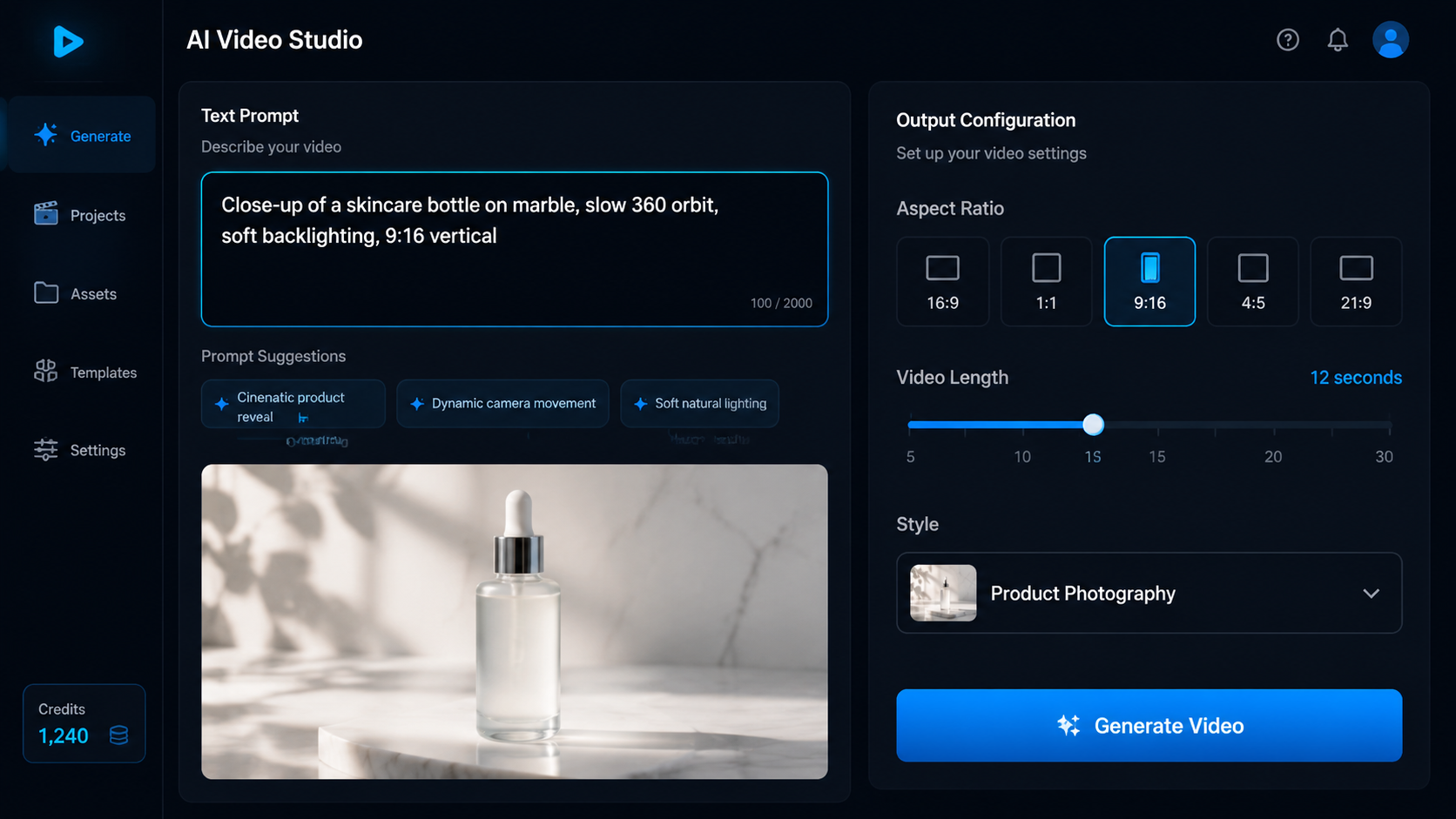
- Open Neural4D Studio: Navigate to Neural4D Studio (link in the CTA below). Select the Text to Video generation mode from the studio sidebar.
- Write your prompt: Use the product prompt formula from Part 2. Subject, action, lighting, platform context. Paste your formatted prompt into the input field.
- Configure output specs: Set aspect ratio (9:16 for TikTok/Reels, 1:1 for feed), video length (6-15s for product ads), and confirm MP4 output is selected.
- Set style controls: Adjust visual style parameters: cinematic, minimal studio, editorial, or product photography. For most e-commerce use cases, minimal studio or product photography styles perform best in paid ad environments.
- Generate: Click Generate. Neural4D processes the prompt and returns a video preview. Review for subject framing, motion behavior, and lighting match against your brief.
- Regenerate if needed: If the framing or motion doesn’t match your brief, adjust the prompt and regenerate. Tighten the subject description or specify the camera move more precisely. One prompt revision typically resolves framing issues.
- Export: Download as MP4. The file is ready for direct upload to your ad platform, Shopify product page, or social media scheduler.
Most sellers get a usable clip within two generation rounds. If the first output doesn’t nail the framing, revise the subject or camera description and regenerate. The prompt is the only variable. See Neural4D’s pricing for plan options if you’re generating video across multiple SKUs at scale.
Generate Your First Product Video
Text prompt in. Export-ready MP4 out. No footage, no editing software, no studio.
Free plan includes 50 Power credits weekly. No credit card required to start.
Part 5: Neural4D vs. Canva, InVideo, and CapCut for E-commerce
The tools most e-commerce sellers already have open are Canva, InVideo, and CapCut. Each has a video generation or AI video feature. The comparison is not that those tools are bad. It’s that they serve a different primary use case.
Canva: Text-to-video capability is template-driven. You get animated slides and preset transitions applied to static product images. It is a design tool that animates, not a video generation tool. No prompt control over camera motion, subject behavior, or lighting physics.
InVideo: AI-assisted video creation from scripts. Assembles stock footage clips to match a narration script. Best for talking-head or voiceover-driven content. Output depends on stock library availability. You cannot describe a specific product shot and get that exact shot.
CapCut: Strong mobile editing with AI effects, including some generative features. Editing-layer approach. The generation is applied to existing footage, not generated from a blank prompt. Strong for short-form social trends but not for original product video creation from scratch.
Neural4D’s differentiator for e-commerce is prompt control at the generation layer. When you generate video with AI in Neural4D, you describe a specific shot setup and the model attempts to produce that exact composition, not a generic approximation using stock material. Canva animates templates. InVideo assembles stock clips. Neural4D generates from your description.
There is a practical limitation worth naming: text-to-video AI generates approximate visual scenes. For products with highly specific typography, surface patterns, or regulated label copy, the generated output may not be accurate enough for compliance-sensitive use cases. For generic product categories, lifestyle content, or mood-driven ads, the output is typically sufficient for paid social and Shopify embeds without additional editing.
Part 6: FAQ on Creating AI Videos for Your Store
Generation time depends on the platform and output length. With Neural4D’s text-to-video feature, a 10-15 second product video clip typically generates in under two minutes after submitting your prompt. The process is fully automated once you configure your specs and click Generate. No rendering queue or waiting on a human editor.
Yes. TikTok Ads, Meta Ads Manager, and Google Performance Max all accept MP4 video submissions without requiring footage source disclosure. The platform review process evaluates content for policy compliance, not for whether it was AI-generated. Verify that the content meets each platform’s creative policies (no misleading claims, correct aspect ratio, appropriate length) before submitting.
Generation creates video from a text description with no source footage required. You start with a blank prompt and receive a rendered clip. Editing applies AI effects or enhancements to video you already have, such as background removal, auto-cut, or style transfer. For e-commerce sellers without existing product footage, generation is the more useful capability. For sellers with existing footage, AI editing can extend what they already have.
The three variables that determine output quality are: prompt specificity (vague descriptions produce generic output), output spec configuration (correct aspect ratio and length for the target platform), and style selection (minimal studio or product photography styles typically outperform cinematic or editorial for e-commerce). Start with a structured four-component prompt as described in Part 2, configure specs before generating, and run one regeneration round with refinement if the initial output needs adjustment.
Yes. Text-to-video AI generates each video from a prompt, not from footage. You write a separate prompt for each product variant, swap the subject description, keep the same motion, lighting, and spec settings, and generate each clip independently. There is no physical reshooting involved. For a catalog with many SKUs, this means a consistent visual style across all product videos without booking additional studio time for each item.

Start Creating High-Converting Product Videos Today
The stack is simple: write a structured prompt, configure your platform specs, generate, refine once if needed, export. The entire process runs inside Neural4D Studio without footage, editing software, or production scheduling. For e-commerce brands managing multiple SKUs across TikTok, Instagram Reels, and Shopify, this is how you create video with AI at the pace your content calendar actually requires.
Your Product. Your Prompt. Your Video.
Stop waiting on production schedules. Generate export-ready MP4 product videos from text in minutes.
50 weekly Power credits on the free plan. Upgrade anytime for higher concurrency and commercial rights.