Meshy 7 Release Date and 7.1 Update: What to Use Now
The Meshy 7 release date was August 10, 2026. Meshy’s launch article and press announcement followed on August 12. The Meshy 7.1 update began rolling out on September 10, 2026, with Ultra 4K as its main geometry upgrade. These dates describe different events: the first workspace release, the announcement, and the later update.
This guide separates that release history from the model choices, input paths and download conditions documented today. If you are choosing between complete products, see our N4D vs Meshy feature comparison.
About this guide: Published by N4D. Official release notes and product documentation were checked on October 30, 2026. Benchmark figures below are reported by Meshy, not independently reproduced by N4D. The older illustrations are identified separately from current product evidence.
Quick Summary
- Release history: Meshy 7 became available on August 10; its official announcement is dated August 12. Meshy 7.1 rollout started on September 10, 2026.
- 7.1 update: Ultra 4K increases geometric resolution. Geometry resolution, texture size and the polygon count of a downloaded file are separate settings.
- Current access: Ultra modes require a paid web-app plan. Generation credits alone do not grant download permission.
- Current API:
meshy-7.1is active;meshy-7is deprecated, with no announced retirement date. Check the specific endpoint before selecting a resolution. - Before using an output: Check shape, polygon budget, topology, materials and the destination application rather than inferring readiness from a version number.
Part 1: Meshy 7 Release Date and Rollout Timeline
The important distinction is when a model became available versus when its announcement was published. A later API release is another event, not a replacement for the original workspace release date.
| Date | Event | What it establishes |
|---|---|---|
| August 10, 2026 | Meshy 7 became generally available in the workspace. | The model’s release date, stated in Meshy’s geometry-alignment launch article. |
| August 12, 2026 | Meshy published its launch article and press announcement. | The announcement date. The Meshy-issued press release also states that the model went live on August 10. |
| September 10, 2026 | Meshy 7.1 started a gradual workspace rollout. | The start of the update’s rollout, as described in the 7.1 announcement, rather than a verified time of availability for every account. |
| September 18, 2026 | The API added meshy-7.1 and geometry_resolution. |
The API changelog records support for Image to 3D, Multi-Image to 3D and Text to 3D, with endpoint-specific resolution limits. |
The August launch focused on matching the input image’s shape and arrangement. September’s update expanded geometric detail.
Part 2: What Changed in Meshy 7.1?
Meshy presents 7.1 as an upgrade to Meshy 7. Its launch description increases the geometry-resolution ceiling from 2048³ to 4096³ through Ultra 4K. Meshy reports that a raw, unsimplified output can reach 80 million triangles. That is a vendor-reported upper figure before simplification, not a promise about the file every user downloads.
Three settings to keep separate: Geometry resolution controls the generation of surface structure. Texture resolution controls the pixel dimensions of image maps. Export or remesh settings affect the delivered mesh. A “4K” texture is not 4096³ geometry, and neither label tells you the final polygon count.
The current web-app Image to 3D guide lists Standard, Ultra 2K and Ultra 4K for Meshy 7.1. Meshy’s 7.1 announcement states that Ultra 2K works with both single-view and multi-view generation, while Ultra 4K is single-view only. The API has a separate set of documented input paths, summarized below.
Part 3: Current Access and Model Availability
Web App: Generation, Ultra Modes and Downloads
The web guide lists Meshy 7.1 under High Detail. It documents Standard at 20 credits and both Ultra modes at 25 credits for the listed generation settings. Ultra 2K and Ultra 4K require a paid plan. On paid plans other than Enterprise, Ultra 2K is the documented default. Check the displayed task cost before generating, especially when enabling additional stages.
Do not confuse the ability to evaluate a model with permission to download it. Meshy’s Free plan documentation gives 100 monthly credits and 10 monthly downloads of untextured Meshy 6 Lite outputs. It excludes newly generated Meshy 7 outputs and textured models from Free-plan downloads. The 7.1 release notice specifically requires a subscription to download 7.1 results.
There is a separate historical entitlement: models generated on Pro or higher remain downloadable an unlimited number of times after downgrading to Free. That does not make new 7.1 outputs freely downloadable. Review the current Meshy plans for the applicable account, billing and licensing terms.
API: Match the Model and Resolution to the Endpoint
As checked on October 30, Meshy’s API model-status page lists meshy-7.1 as active and meshy-7 as deprecated, with retirement still to be announced. Deprecated means still available but no longer recommended; it does not mean the model has already been removed. The standard-model alias latest currently resolves to 7.1. Pin an explicit model name when you need a repeatable configuration.
| API path | Documented geometry settings | Important condition |
|---|---|---|
| Image to 3D | standard, 2k, 4k |
4k requires meshy-7.1 or the current latest alias. |
| Multi-Image to 3D | standard, 2k |
One to four reference images. This endpoint does not list 4k geometry. |
| Text to 3D | standard, 2k, 4k on preview tasks |
4k requires meshy-7.1 or latest. A refine task with geometry_resolution is rejected. |
Use geometry_resolution for new integrations. The older ultra_mode: true parameter is deprecated and maps to geometry_resolution: "2k"; it does not request 4K. Check API pricing separately from a web-app subscription. This is a documentation review, not a newly executed API test.
Smart Topology is also a separate choice. The current API documents T2 and T2.5, while the web guide still names T2. If the next task is changing topology or individual parts, use the Meshy T2 topology and editing comparison rather than treating Ultra 4K as a Smart Topology upgrade.
Part 4: How to Interpret the Published Benchmarks
Meshy 7: Geometry Alignment
Meshy’s August article measures generated geometry against reference models held out from training. It reports three aspects: overall proportion, spatial distribution and surface details. Under the single-view input condition, Meshy 7 scores 81.0%, 79.7% and 59.8%, respectively.
These are Meshy’s published measurements. The article also reports a four-view condition, so a result described as leading under single-view input should not become a claim of winning every input condition. The measurements address agreement with reference geometry; they do not provide this article with a measured cleanup time or a test of your rig.
Meshy 7.1: Detail Richness
For 7.1, Meshy reports a different metric based on fine surface variation visible across rendered views. Its input set emphasizes geometric structure with simple textures. The following values are retained from the official 7.1 benchmark table.
| Tested model | 1024 render | 2048 render | 4096 render |
|---|---|---|---|
| Meshy 7.1 | 53.5% | 37.4% | 23.1% |
| Rodin 2.5 | 51.4% | 35.0% | 21.1% |
| Hi3D 3.0 | 49.1% | 34.4% | 21.9% |
| Tripo 3.1 | 44.8% | 29.5% | 17.3% |
| Hunyuan3D 3.1 | 39.4% | 25.4% | 14.7% |
The column labels are render resolutions used to evaluate detail, not texture sizes or guaranteed export settings. Compare values within the same column. N4D is not included in this table, so it cannot establish an N4D-versus-Meshy ranking.
A higher detail score does not answer every production question. A static ornament, a deforming character and a printable part have different acceptance criteria. The useful follow-up is to inspect the asset for your task.
Part 5: What to Check Before Using the Output
Use the same reference, intended camera distance and destination software when comparing results. Keep a record of the model version, input path, geometry setting, texturing stage, any remeshing and the downloaded format. This turns a visual impression into a comparison you can repeat.
- Shape: Rotate the asset and check the back, hidden surfaces, component positions and repeated features. A pleasing front view does not establish that unseen geometry matches the intended object.
- Mesh: Inspect actual face count, disconnected parts and edge flow. Try the planned selection, deformation or sculpting action.
- Materials: Open the export in the target application. Verify UVs, texture files and material connections under the lighting you intend to use.
- Delivery: Test the asset in its actual scene or slicer. For printing, check dimensions, wall thickness and closure. For interactive use, check the scene’s polygon and material budgets.
- Acceptance: Record any manual correction needed and decide whether the extra geometric detail remains useful in the final output.
Meshy also documents a separate Remesh workflow with Quad and Triangle choices. Compare its result with the original for lost details. Higher generation resolution alone does not tell you whether remeshing is necessary, or whether a particular deformation will succeed.

An Archived House Example, Not a Meshy 7.1 Benchmark
The earlier article included the image below beside a fantasy-house prompt. The available draft does not preserve the Meshy version, complete settings, run dates or original exported files needed to reproduce that comparison. It therefore cannot establish how Meshy 7 or 7.1 performs against N4D today.
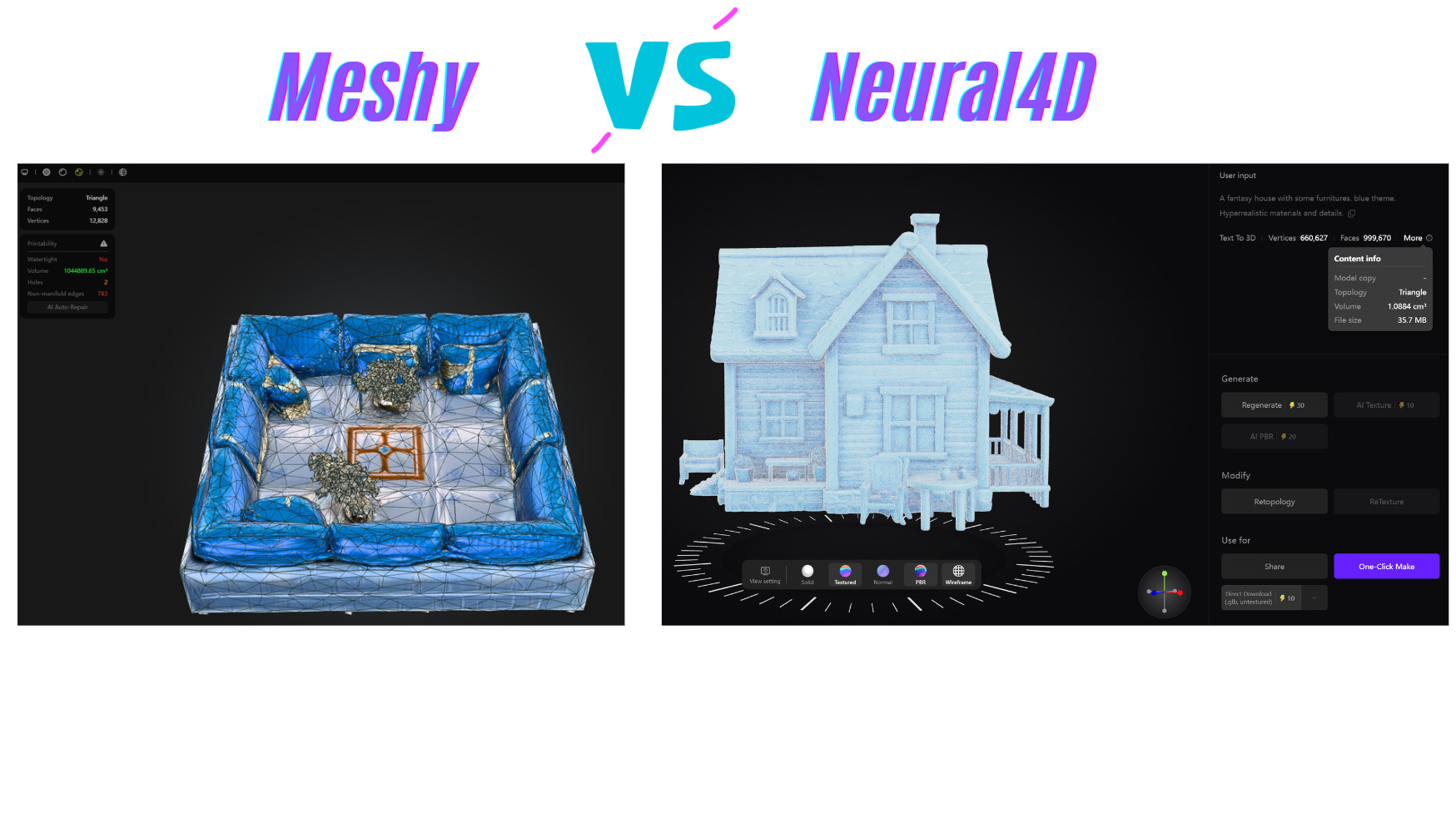
For a new house-model evaluation, use an exterior or interior reference consistently, record the settings, and compare the actual deliverables. Our 3D house-model workflow guide can help frame that task. Material appearance in a screenshot is not proof of watertight geometry or engine compatibility.
Part 6: Related Links
The feature comparison above covers generation workflows, topology choices, materials, exports and plan conditions. The T2 topology comparison covers editing, including the distinction between Smart Topology and high-detail generation.
If you need more options, review Meshy alternatives with free access, with separate checks for generation, download and licensing limits.
If you want to test N4D, its current Quad generation guide explains topology selection before generation. N4D defaults to Triangle and lets you request Quad. That is a setting to evaluate with your own input, not a guarantee that an exported asset needs no further work.
Test One Reference in N4D
Use the same reference image, inspect the mesh, and check the export in your destination application. Review the current plan before downloading.
For download conditions, check current N4D plans.
Part 7: Which Version Should You Use Now?
For Meshy’s high-detail workflow, start by checking the currently documented 7.1 model and the resolution supported by your input path. For an API integration still using meshy-7, review the replacement and test it before changing production requests. The release timeline remains useful history, while the current documentation determines what you can request today.
Choose based on the next task: preserving fine surface structure, editing a mesh, preparing a print, or delivering a working asset. Then verify that task with an exported file. Neither a launch date nor a benchmark percentage replaces that check.
Questions About Meshy 7 and 7.1
Why do sources give both August 10 and August 12 for Meshy 7?
August 10, 2026 is the workspace availability date stated by Meshy. August 12 is the date on its launch article and press announcement. They refer to different events.
Was Meshy 7.1 available to everyone on September 10?
The announcement describes a gradual rollout starting September 10, 2026. It does not establish the exact time each account received access. API support is recorded separately on September 18.
Can I use Ultra 4K with multiple reference images?
Not in the currently documented Image to 3D multi-view workflow or Multi-Image API. Use Standard or Ultra 2K for that path. The Text to 3D API separately supports 4K geometry on eligible preview tasks.
Does buying credits unlock Meshy 7.1 downloads?
No. Credits pay for generation, while download permission follows the plan and asset entitlement. The 7.1 release notice requires a subscription for its downloads; models made during an earlier paid subscription have separate continuing download rights.
Has the Meshy 7 API model been shut down?
It is listed as deprecated, not retired, as of this review. Meshy recommends 7.1 and has not announced a retirement date for meshy-7. Check the model-status page before maintaining an older integration.
Does Ultra 4K guarantee animation-ready or print-ready output?
No. Inspect the actual mesh for the task. Deformation, polygon budget, material import, wall thickness and dimensions need their own checks. Use the topology comparison when editing is your main requirement.