
Meshy 7 Release Date and 7.1 Update: What to Use Now
Quick Summary
- Meshy 7 released on August 10, 2026, and version 7.1 followed on September 10, 2026, adding an Ultra 4K mode.
- Ultra 4K raises image to 3D geometry resolution from 2048³ to 4096³, with raw meshes of up to 80 million triangles before simplification.
- Ultra 4K accepts single-image input only, and downloading any Meshy 7.1 result requires a paid subscription.
- Both releases target alignment and geometric detail, not the production-ready topology studios need, which is why Neural4D remains the choice for engine-ready 3D assets.
The Meshy 7 release date was August 10, 2026, and the 7.1 update arrived on September 10, 2026. Together they raised the detail ceiling of image to 3D generation without addressing the production-ready topology studios actually need, which is why Neural4D remains the choice for engine-ready 3D assets.
Table of Contents
- Part 1. The Meshy 7 Release Date and What It Actually Ships
- Part 2. Meshy 7.1 and Ultra 4K: What Changed on September 10
- Part 3. Alignment Scores vs. The Production Reality
- Part 4. Why I Switched to Native 3D Generation
- Part 5. The Fantasy House Benchmark Test
- Part 6. How Studios Are Scaling Today
- Part 7. Conclusion: Build With Production-Ready Topology
- FAQ: Meshy 7, Meshy 7.1, and AI 3D Generator Updates
Part 1. The Meshy 7 Release Date and What It Actually Ships
Meshy 7 was released on August 10, 2026 and officially announced on August 12, 2026. It is a new image to 3D foundation model built around a single standard: the 3D result should agree with the image the user brought. According to the official announcement, Meshy 7 scores 81.0% on overall proportion, 79.7% on spatial distribution, and 59.8% on surface details under single-view tests. On surface details it leads the closest of four competing foundation models by 5.3 points, more than double its margin on the other two aspects. If you want to learn how to create AI 3D game assets with clean topology, you know the exact pain points I am talking about. The alignment gains are real progress; they are not the same as a mesh you can drop straight into a production engine.
What the announcement does not promise is a fix for the issues studios actually feel: messy topology and structural melting on hard-surface props. Meshy 7 opens to all subscription tiers, but downloading generated models still requires the Pro tier or above.
Part 2. Meshy 7.1 and Ultra 4K: What Changed on September 10
Meshy 7.1 rolled out on September 10, 2026, and its headline feature is a new Ultra 4K mode. Per the 7.1 launch post, Ultra 4K scales geometry generation from 2048³ to 4096³, and Meshy describes it as the only 3D generative model reaching that resolution to date. A raw mesh at that setting can contain as many as 80 million triangles before simplification.
Meshy ships three settings: Standard, Ultra 2K, and Ultra 4K. Ultra 2K accepts single-view and multi-view input, while Ultra 4K is single-view only, with multi-view support stated as coming later. Meshy 7.1 is open to all registered users, but Ultra 2K, Ultra 4K, and downloading 7.1 output all require a paid subscription.
To back the claim, Meshy published a Detail Richness benchmark that renders each model from multiple directions and measures the fraction of its surface whose orientation varies significantly inside a single pixel. A larger percentage means more retained detail, and because a higher render resolution resolves finer structure, the scores fall as resolution rises. On that basis 7.1 ranked first at every tier:
| Model | Detail Richness at 1024 | Detail Richness at 2048 | Detail Richness at 4096 |
|---|---|---|---|
| Meshy 7.1 | 53.5% | 37.4% | 23.1% |
| Rodin 2.5 | 51.4% | 35.0% | 21.1% |
| Hi3D 3.0 | 49.1% | 34.4% | 21.9% |
| Tripo 3.1 | 44.8% | 29.5% | 17.3% |
| Hunyuan3D 3.1 | 39.4% | 25.4% | 14.7% |
Meshy notes that its lead over Rodin 2.5 is only 2.1 points at 1024 and 2.4 points at 2048, and that no competitor reaches 22% at the 4096 render tier. The company also measured its own input set with images that carry strong structural detail but simple textures, so each measured difference is a geometric fact rather than a texture artifact, and it plans to release the benchmark as a standalone tool.
What 4096³ does not change: resolution is a density dial, not a topology fix. A denser voxel grid produces more triangles, and more triangles inherit the same edge flow the model already generates. That is the gap Neural4D is built around, and it is covered in the Neural4D vs Meshy comparison.
Part 3. Alignment Scores vs. The Production Reality
Now that both the Meshy 7 release date and the 7.1 update have passed, the next question is whether alignment and detail scores translate into usable output. Some AI tools prioritize generation speed and image match over geometric accuracy. You might get a model that matches your reference image in seconds, but then spend far longer in Blender manually retopologizing a fused mess of vertices. This is a massive drain on your pipeline. As detailed in our text to 3D model AI guide, professional studios care about usable output, not just marketing benchmarks.
Skip the Clean-Up Phase
Stop wasting hours fixing bad topology. Generate high-poly, production-ready meshes that are ready for your engine.
Skip Manual Cleanup and Generate Now
Free users get 50 credits per week. No credit card required.
Part 4. Why I Switched to Native 3D Generation
Instead of hoping for an update, I shifted my workflow to Neural4D. The core difference lies in the underlying architecture. Neural4D utilizes a native 3D method to output mathematically clean meshes. Let me be completely transparent: Neural4D might take slightly longer to process a prompt than its competitors. However, we provide a significantly higher quality model with dense vertex and face counts. You trade a few extra seconds of compute time to eliminate hours of manual mesh repair. Once the generation is complete, you can instantly export into standard industry formats including .obj, .fbx, .glb, .usdz, .stl, and .blend. For a detailed comparison of the two generation approaches, see our Neural4D vs Meshy comparison.
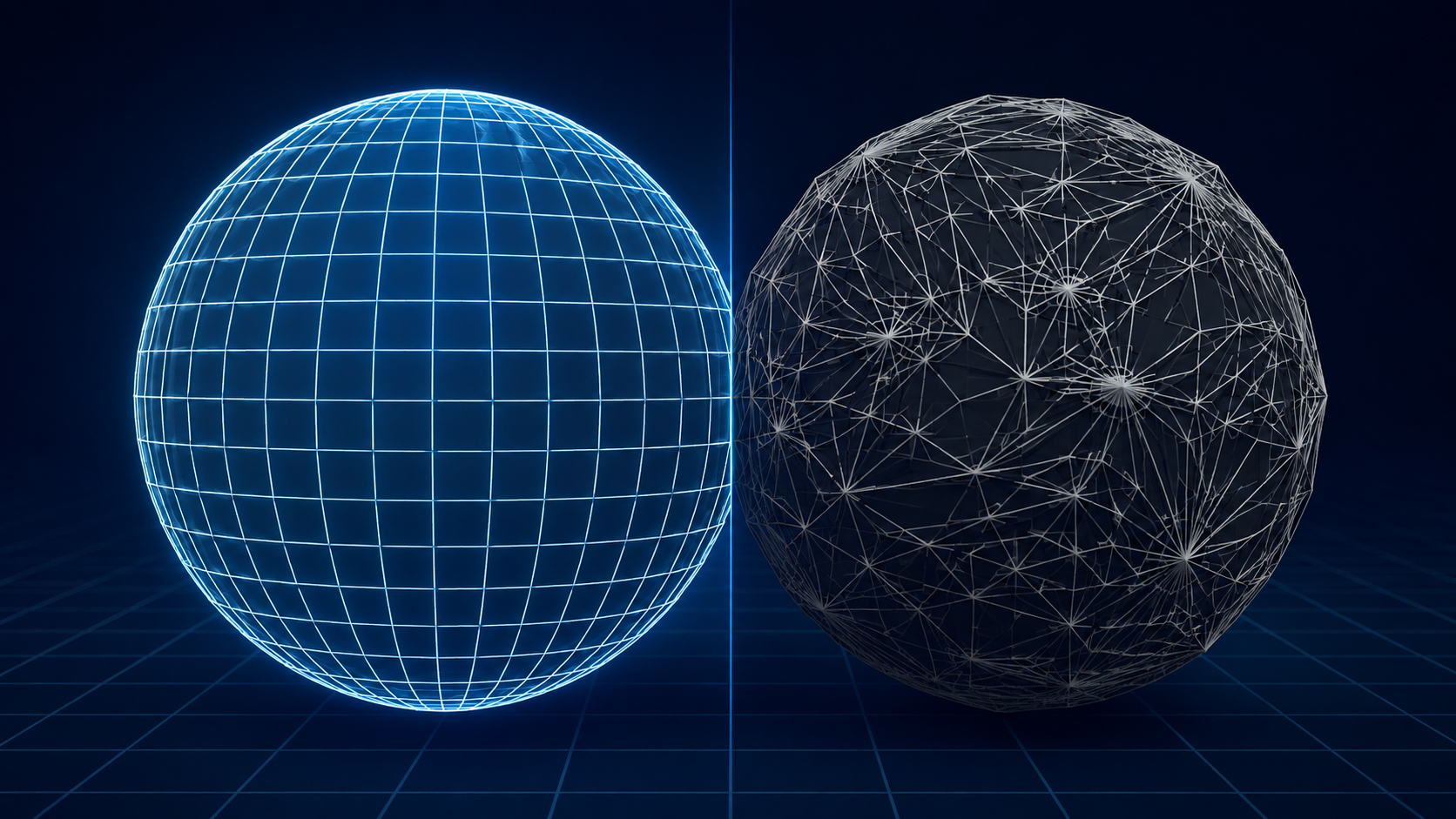
Clean, production-ready topology on the left versus the fused, melted mesh you get from typical AI generation on the right.
Part 5. The Fantasy House Benchmark Test
To demonstrate this, I ran a direct prompt test to compare generation quality. The prompt was: “A fantasy house with some furnitures. blue theme. Hyper-realistic materials and details.” If you want to dive deeper into this specific workflow, you can discover how to make a 3D house model structure effectively. The resulting geometry speaks for itself.
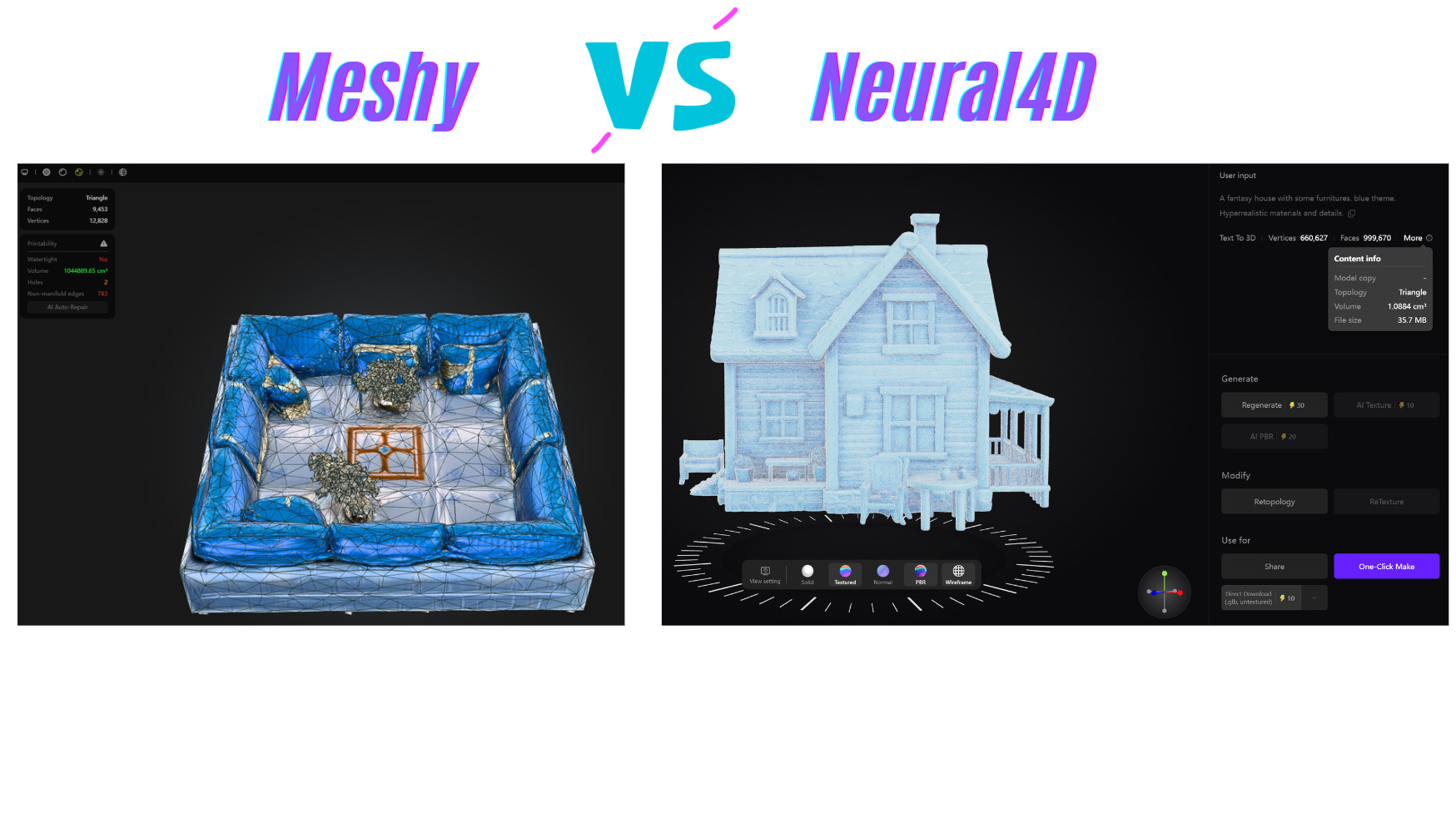
Notice the structural integrity on the right side: Neural4D’s clean topology avoids common issues like fused walls or melted props often seen in AI-generated models. This results in an immediate ready-to-use mesh for Unreal Engine 5, and because the material maps are separated, light interacts with them the way a PBR renderer expects. This level of quality is why many users looking for viable Tripo alternatives or Meshy replacements are migrating their pipelines today.
Part 6. How Studios Are Scaling Today
You do not have to take my word for it. The pattern that shows up when studios move to Neural4D is consistent: a Neural4D .fbx export goes straight into an Unreal Engine level and lighting can start immediately, because the prop modeling step no longer includes a repair pass. That is the practical difference a production-ready mesh makes.
Part 7. Conclusion: Build With Production-Ready Topology
The Meshy 7 release date has come and gone, and the 7.1 update has pushed detail further still. Both are real improvements, and the detail ceiling of image to 3D generation is genuinely higher than it was at the start of the year. But a benchmark score is not a production mesh, and 80 million triangles are still 80 million triangles if the edge flow does not follow the form. By prioritizing native 3D generation and clean topology, you can bypass the manual repair grind and focus on what actually matters: building great games and products. Copy your prompts into Neural4D today and experience the difference a production-grade mesh makes to your daily workflow.
Upgrade Your Asset Pipeline Today
Claim your free credits and start generating watertight, high-poly models today. Used by 80,000+ creators.
Skip Manual Cleanup and Generate Now
Free users get 50 credits per week. No credit card required.
FAQ: Meshy 7, Meshy 7.1, and AI 3D Generator Updates
Q: When is the Meshy 7 release date?
Meshy 7 launched on August 10, 2026, with the official announcement following on August 12, 2026. It is a new image to 3D foundation model focused on alignment between the input image and the generated 3D result. For creators who need production-ready meshes without manual cleanup, Neural4D offers native 3D generation with clean, exportable assets today.
Q: When did Meshy 7.1 come out?
Meshy 7.1 rolled out on September 10, 2026, first in the Meshy workspace and then to all users. It is an upgrade to Meshy 7 rather than a new foundation model, and its headline feature is the Ultra 4K geometry mode.
Q: What is Meshy Ultra 4K and how much detail does it add?
Ultra 4K raises image to 3D geometry generation from 2048 cubed to 4096 cubed, which Meshy says is the only 4096 cubed geometry resolution on the market to date. A raw mesh at that setting can reach 80 million triangles before simplification. In Meshy’s own Detail Richness benchmark it scored 23.1% at the 4096 render tier against 21.9% for Hi3D 3.0 and 21.1% for Rodin 2.5, so the lead over the nearest competitor is narrow.
Q: Can I use Ultra 4K with multiple reference images?
Not yet. Ultra 4K is limited to single-image input at launch. Ultra 2K accepts both single-view and multi-view input, so multi-view workflows are capped at the 2K tier until Meshy extends 4K support. Meshy 7.1 itself is open to all registered users, but Ultra 2K, Ultra 4K, and downloading 7.1 output all require a paid subscription.
Q: Did Meshy 7.1 fix the messy topology issues?
No, and Meshy does not claim it did. The 7.1 launch post measures geometric detail richness, not edge flow, manifoldness, or editability. A denser voxel grid adds triangles; it does not restructure how those triangles are arranged. If topology is the constraint in your pipeline, extra resolution will not remove the retopology step, and Neural4D already provides native 3D generation with clean, highly usable meshes today.
Q: How does Meshy 7 compare to other AI 3D generators?
In official single-view alignment tests, Meshy 7 led four competing foundation models, with its widest margin on surface details at 5.3 points ahead of the closest competitor. The 7.1 Detail Richness results are closer: the gap to the runner-up is 2.1 points at the 1024 render tier and 2.4 points at 2048. Strong alignment and detail scores do not guarantee clean, production-ready topology.
Q: How does Meshy 7.1 compare to Meshy 7?
Meshy 7.1 is positioned as an upgrade to Meshy 7 rather than a new base model. It adds the Ultra 4K mode, expanding the geometry resolution ceiling from 2048 cubed to 4096 cubed, and introduces a Detail Richness benchmark to quantify the gain. The alignment focus of the original release is unchanged, and neither version promises production-ready topology.
Q: Is Meshy 7 available to all Meshy users?
Meshy 7 is open to all Meshy subscription tiers, and 7.1 is open to all registered users. Downloading generated models requires the Pro tier or above, and both Ultra modes require a paid subscription. Ultra 4K currently supports single-view generation, with multi-view support arriving shortly.
Q: What is the best alternative to Meshy 7.1 for game assets?
For professionals requiring clean topology and direct engine integration, Neural4D is currently the top alternative. It natively exports high-poly, production-ready assets in .fbx, .glb, and .obj formats, allowing you to bypass the manual cleanup phase regardless of which Meshy version generated the comparison model.