Multi-View 3D Models for Etsy Product Listings: A Seller’s Workflow Guide
Quick Summary
- A multi-view 3D model for Etsy product listings fills slots 2 through 10 with lifestyle scenes, color variants, and AR previews while slot 1 stays an original photo of your real product.
- Etsy’s listing image policy requires the first image to be an original photo of the actual product for most categories; renders and mockups are allowed only in supporting slots.
- Multi-view 3D generators take six product photos (front, back, left, right, top, bottom) and produce a geometry locked mesh, while single image tools infer the unseen sides and often drift between angles.
- Print-on-demand sellers can use 3D mockups in slot 1 when the mockup shows their original artwork on a base product produced through a production partner.
- Neural4D’s Multi-View to 3D studio accepts the six standard angles, exports GLB for Etsy-compatible AR previews, and outputs PNG renders ready for lifestyle slots, all from the same locked mesh.
A multi-view 3D model for Etsy product listings is one of the cheapest ways to fill all ten image slots on a listing without booking a new photoshoot for every color or variant. The catch is Etsy’s image policy, which most AI-tool tutorials skip: your first image still has to be a real photo of the actual product for almost every category. This guide shows where multi-view 3D models fit, why six angle input beats single image generators for marketplace work, and how to produce a listing ready mesh in one session.
Table of Contents
- Part 1: Why Etsy Sellers Are Adding Multi-View 3D Models to Listings
- Part 2: Etsy’s Image Rules for 3D Renders and Mockups
- Part 3: From Six Product Photos to a Locked 3D Model in Neural4D
- Part 4: Where a Multi-View 3D Model Fits in the Etsy Listing Stack
- Part 5: Generating Lifestyle Scenes From Your Locked 3D Model
- Part 6: Common Questions About Multi-View 3D Models for Etsy Listings
- Build Your Etsy Listing Stack With Neural4D
Part 1: Why Etsy Sellers Are Adding Multi-View 3D Models to Listings
Three numbers explain why a multi-view 3D model for Etsy product listings has become a practical replacement for half your photoshoot budget. A traditional product photoshoot runs $200 to $500 per session when you factor in the photographer, studio time, and editing. A multi-view 3D generator turns a six photo capture session into a reusable mesh for somewhere between $0.10 and $1 in credits. And listings with lifestyle-style supporting images convert at roughly 35 to 50 percent higher click-through rates than plain white-background shots, according to seller-side analytics from marketplaces that track this.
The math gets sharper when you scale. A handmade jewelry seller with 30 SKUs, each in 4 color variants, needs 120 hero shots if they shoot every variation in studio. With a locked multi-view 3D model per SKU already in hand, the seller shoots the original sample once for slot 1, then generates the remaining 119 color and scene variants from the mesh, all from the same geometry. The reason this matters on a marketplace: every supporting image in a listing has to look like the same product, and re-photographing or re-prompting a 2D AI tool for each angle introduces visible drift. Multi-view 3D locks the geometry first, then derives every variant from that one source.
That’s also why single image AI 3D tools fall short for marketplace work. A single front facing photo gives the generator no real information about the back, the top, or the bottom of your product; the algorithm has to guess. For a hero shot in slot 1 that’s fine, but Etsy slots 2 through 10 often show angles the single image tool was guessing at. Six view input replaces those guesses with actual photos.
The temptation is to skip the photo step entirely. Don’t. The next section explains why, and how Etsy enforces it.
Part 2: Etsy’s Image Rules for 3D Renders and Mockups
Etsy’s Listing Image Requirements policy sets a clear rule that most AI tool tutorials gloss over: every Etsy product listing’s first image must be an original photograph of the actual item the buyer will receive. Computer-generated mockups, 3D renders, and AI-generated imagery are permitted, but only in slots 2 through 10, and only when they accurately represent the real product.
The slot-by-slot rule for most Etsy categories:
- Slot 1 (hero): Original photo of the finished product. Required.
- Slots 2 to 10: 3D renders, lifestyle mockups, color variants, scale references, and AR previews allowed if they reflect the real product.
Two exceptions exist. Personalized items can use a mockup or render in slot 1 as long as it shows a finished customized example, not a blank base product with a “Your Text Here” placeholder. Print on demand sellers working with production partners can use stock product mockups in slot 1 when the mockup features their original artwork on the base product. Handmade goods, vintage items, and craft supplies follow the standard real photo rule.
The technical specs apply to every image regardless of source:
| Spec | Requirement |
|---|---|
| Minimum size | 2,000 pixels on the shortest side |
| Recommended | 2,400 x 2,400 px (1:1 square) for best cross-device crop |
| Formats | JPG, PNG, GIF, HEIC |
| File size cap | 20 MB per image (under 1 MB recommended for upload speed) |
| Image limit | 10 photos plus 1 video per listing |
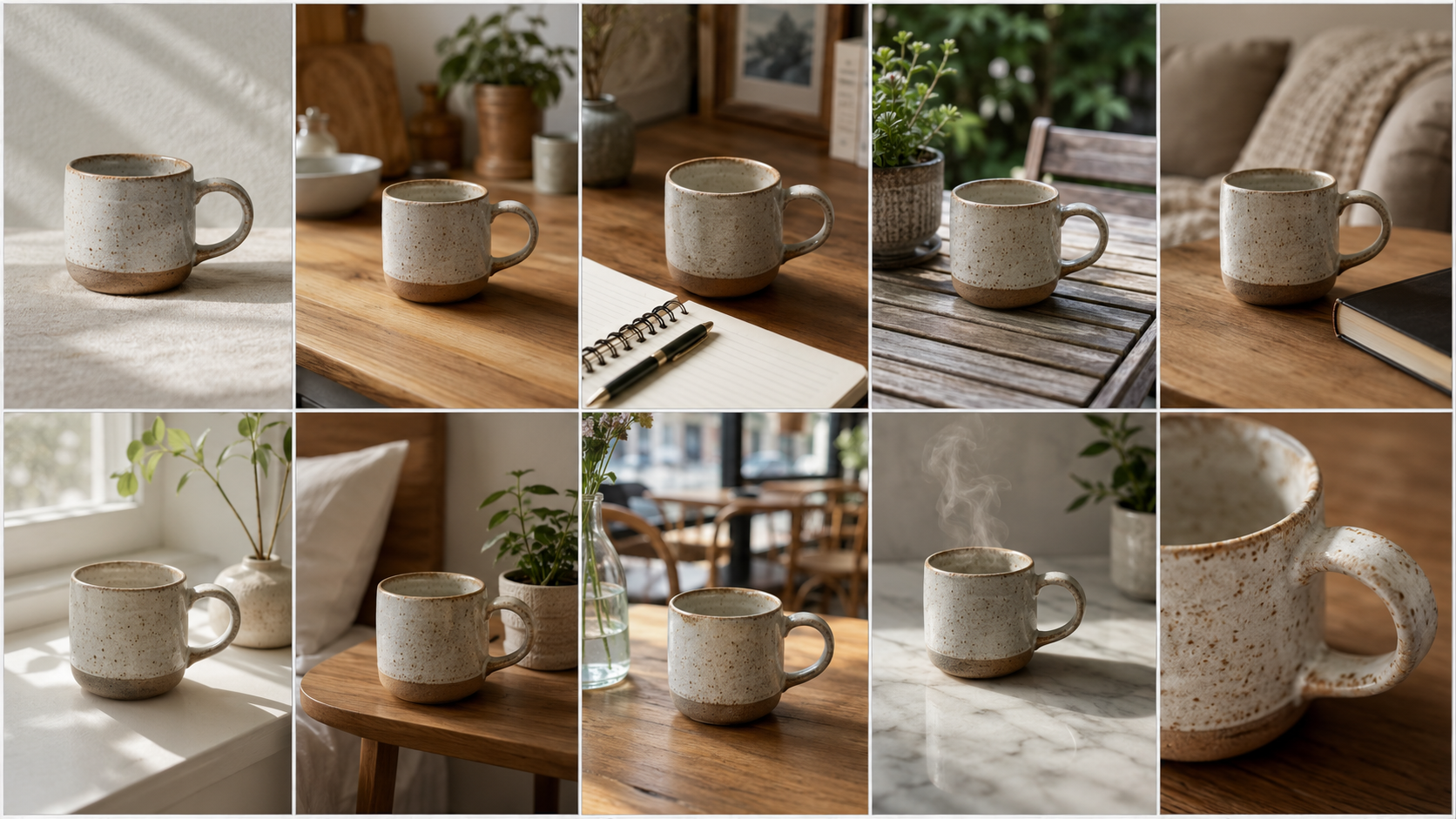
If you’re coming from a Shopify or Amazon workflow, the rule is stricter on Etsy. Our Shopify 3D model guide covers how Shopify treats 3D only product images differently, since Shopify lets you set the hero slot to a render without the same review process.
Part 3: From Six Product Photos to a Locked 3D Model in Neural4D
Generating a multi-view 3D model for Etsy product listings is a one session workflow in Neural4D. Six photos of your product go in, a geometry locked mesh comes out, ready for export. Because each angle is grounded in a real photo, the back of the model is not an algorithmic guess; it is your actual product’s back. Use the Neural4D feature page for the entry point.
Shoot the six standard angles. Front, back, left, right, top, and bottom. Use a turntable or a single mark on the floor so the product sits in the same position for each shot. Plain or soft-contrast background. Consistent lighting across all six shots, since changing the lighting changes how the algorithm reads volume on each side.
Upload the six views and assign each to its angle slot. Open the Multi-View to 3D studio, drop each photo into its labeled slot (front, back, left, right, top, bottom), then toggle PBR textures on if you want a fully shaded GLB for AR. The studio shows a live preview of how the views align before generation.
Generate. The system fuses all six views into a single watertight mesh. Because the algorithm is fitting geometry to real photos rather than inferring unseen sides from one, the resulting model carries fewer artifacts on the back and underside, which is exactly where single image tools tend to drift. PBR textures are produced in the same pass when enabled.
Export and download. GLB for AR previews and lifestyle compositing, FBX for further work in Blender or Maya, OBJ for traditional pipelines, STL if you also sell a 3D printable version of the product as a digital download.

For sellers comparing tools before committing to one workflow for their multi-view 3D model for Etsy product listing assets, our roundup of the best image to 3D AI tools walks through Neural4D, Meshy, Tripo, and others on geometry quality and watertightness. Watertight matters specifically here because non-watertight meshes break in AR viewers and produce visible seams when you render lifestyle scenes from multiple angles.
Turn six product photos into nine consistent listing images.
Upload the six standard angles, generate a geometry locked mesh, then export GLB, PNG, and STL ready for Etsy slots 2 through 10.
Open Neural4D Multi-View to 3D
Free plan includes 50 Power per week for testing on your own product photos.
Part 4: Where a Multi-View 3D Model Fits in the Etsy Listing Stack
Once you have a locked multi-view 3D model sitting in your file system, the next question is which Etsy slots it earns and which it doesn’t. The table below maps each listing position to whether the 3D output makes sense, and which export format you use. Neural4D appears first because Multi-View to 3D is the only six view workflow on this list; the other tools listed accept single image input only, which is why their geometric reliability for slots 6 through 10 drops off.
| Tool | Input | Geometry reliability | PBR textures | Best for Etsy slot |
|---|---|---|---|---|
| Neural4D Multi-View to 3D | Six photos (front, back, left, right, top, bottom) | Geometry locked from real photos on all six sides | Yes, in same pass | Slots 2 to 10, AR preview |
| Meshy AI | Single image | Back and underside inferred | Separate texture step | Slots 2 to 5 (lifestyle) |
| Alpha3D | Single image | E-commerce tuned, inferred back | Yes | Slots 2 to 5 |
| Manual Blender | Manual modeling | Whatever you build | Manual setup | Any slot if you have time |
The four most-used positions for a multi-view 3D model on an Etsy listing:
Slot 2 to 3: lifestyle scenes
Drop the 3D model into a styled interior render. Living room with the product on a coffee table, kitchen shelf, desk setup. Etsy’s algorithm rewards engagement, and lifestyle context drives most of it. A render here costs roughly the same as a credit on an AI image tool, far below booking a photographer for staged shots.
Slot 4 to 5: color variants
This is the single biggest cost saver. Re-rendering a locked 3D model in a new color takes seconds; re-shooting a real product in a new color means ordering inventory, restaging, and reshooting. If your shop runs 4+ variants per SKU, the multi-view approach pays for itself on the second variant, and every variant uses the exact same geometry so proportions stay identical across the listing.
Slot 6 to 7: size and scale references
A render showing your product next to a known-size object (a coffee mug, a smartphone) compositing both in the same scene. Returns drop significantly when buyers can visualize scale before ordering, since the most common refund reason on marketplaces is “smaller than expected.” A multi-view 3D model makes this trivial since you can place a reference object in the same scene at exact dimensions and the underside of your product looks like the real underside, not an inferred one.
Slot 8 to 10: AR preview
Etsy supports GLB-based AR Quick Look on iOS. Upload your exported GLB file as part of your listing assets so mobile buyers can place the product in their own space. AR previews stress-test the back and underside of the mesh the moment a buyer rotates the model, which is where multi-view input pays off most. Almost no Etsy seller offers this in 2026, which makes it a CTR differentiator.
For sellers running a parallel storefront on other marketplaces, the workflow stays similar. Our 3D product rendering for ecommerce guide covers the same pipeline applied to Amazon’s stricter slot rules.
Part 5: Generating Lifestyle Scenes From Your Locked 3D Model
A multi-view 3D model for Etsy product listings isn’t the finished image you upload; it’s the source for the supporting renders that go into slot 2 onward. There are three common pipelines for converting the locked mesh into upload-ready imagery, depending on how much manual control you want.
Pipeline A: Direct Render in Neural4D
Inside Neural4D, render the locked 3D model against a chosen environment background. Output is a flat PNG at 2400 x 2400 or higher, ready to upload to slot 2 onward. Fastest path; no third-party software required. Best for sellers who need volume and accept the available environment presets.
Pipeline B: Composite in Photoshop or Affinity Photo
Export the 3D model as a PNG render with transparent background, then composite it onto a photographed interior scene. You can also follow a step by step image to 3D guide for related single image workflows. Best when you want hand tuned shadows and color grading per listing.
Pipeline C: Render in Blender for Hero-Adjacent Quality
Import the FBX or GLB into Blender, set up your own three-point lighting and HDR environment, render at high samples. Slowest, highest visual quality. Use this for slot 2 where the image often loads as a near-hero on mobile.

One practical tip for print on demand sellers: the same locked Neural4D mesh that drives your Etsy listing images can be re-rendered for Printful or Printify mockup pipelines. This keeps your product proportions identical across every channel, where re-shooting introduces lighting and angle drift between marketplaces. The Neural4D photo to 3D feature covers the single image path when you have only one product shot available and the back is not visible to buyers in that listing.
Trust signal that’s easy to miss. A lifestyle render with no real-product detail shots elsewhere on the listing reads as “AI-generated stock.” Always include at least one tight close-up of the real product, typically in slot 3 or 4, so buyers can verify texture and finish. Mockup blindness is a measurable conversion killer once it sets in.
Part 6: Common Questions About Multi-View 3D Models for Etsy Listings
Q: Can I use a 3D render as the first photo on my Etsy listing?
For handmade, vintage, and craft supply categories, no. Slot 1 must be an original photograph of the actual finished product. Two exceptions: personalized items (slot 1 can show a finished customized example), and print on demand with a production partner (slot 1 can show your original artwork on a base product mockup). If you’re in a standard handmade category and use a render in slot 1, your listing can be deactivated under Etsy’s image policy.
Q: What file format should I export from my 3D tool for Etsy upload?
Etsy accepts JPG, PNG, GIF, and HEIC for listing photos. From your 3D model, render the scene as PNG with transparent background if you plan to composite, or directly as JPG at 80 to 90 percent quality, sRGB color space, 2400 x 2400 pixels square. Etsy does not accept GLB as a listing image; GLB goes into the AR Quick Look slot separately on supported listings.
Q: Will Etsy buyers penalize my listing if they can tell an image is a 3D render?
Buyer behavior data is mixed. A render that accurately represents the product converts about as well as a comparable photo in slots 2 through 5. The penalty kicks in when the listing has no real-product close-up at all: scrolling through ten polished renders with zero macro shots reads as inauthentic and the conversion rate drops sharply. Always include at least one tight detail photo of the real item to anchor trust.
Q: Does the multi-view approach work for small handmade jewelry?
Yes, and it works better than single image tools for jewelry specifically. Rings, pendants, and earrings have detail on every side that buyers will rotate through in AR. Capture the six views (front, back, left, right, top, bottom) using a macro setup with consistent lighting and a contrasting background. Keep the piece centered and at the same distance from the lens for each shot so the algorithm reads the views as the same object. Engravings, stones, and clasps come out cleaner because the back view is photographed, not inferred.
Q: Can I sell my 3D model file as a downloadable digital product on Etsy?
Yes, this is a separate use case from listing images. Etsy permits digital downloads including STL files for 3D printing, GLB for AR or game-engine use, and FBX for animation pipelines. Neural4D exports all three formats. The listing-image rules still apply: your digital-product listing needs a real photo or render that accurately represents what the buyer downloads, such as a render of the printed object alongside the file format details.
Q: How do I keep listing images visually consistent when I have dozens of products?
Use the same locked multi-view mesh as the source for every supporting image in a listing. Six view input fixes geometry across every angle, so slot 2 (front 3/4), slot 4 (color variant from the side), and slot 6 (scale reference from above) all show the same proportions of the same product. Re-photographing across multiple sessions introduces lighting drift, white balance shifts, and angle variance, and single image 3D tools introduce a different drift where the inferred back of slot 6 doesn’t match the photographed back of slot 4. A locked multi-view mesh eliminates both.
Build Your Etsy Listing Stack With Neural4D
A multi-view 3D model for Etsy product listings is the cheapest path to filling slots 2 through 10 with lifestyle scenes, color variants, scale references, and AR previews while keeping slot 1 compliant with Etsy’s real photo rule. Neural4D’s Multi-View to 3D studio fuses six product photos into a geometry locked mesh, then returns every export format you need for the supporting slots in your listing.
From six product photos to nine consistent listing images.
Upload your six standard angles, lock the geometry, then export GLB, PNG, and STL for every Etsy slot from lifestyle scenes to AR preview.
Start Generating Your Multi-View 3D Model
50 free Power per week. Commercial-use rights on paid plans.