What Polygon Count Do You Need for 3D Game Assets, 3D Printing, and WebAR?
Quick Summary
- Game asset budgets are set in triangles, not raw polygons: mobile hero characters run 1,500 to 5,000 triangles, console and PC heroes 15,000 to 50,000, and environment props 500 to 5,000.
- 3D printing is governed by watertight, manifold geometry and wall thickness, with a 100,000 to 500,000 face sweet spot for FDM and 500,000 to 1,500,000 for resin.
- WebAR models target 50,000 triangles or fewer with a GLB under 4 MB after Draco compression so they load inside a mobile browser.
- LOD chains and baked normal maps let a lean triangle budget read as high detail at distance, which is why budgets are decided per role, not per art style.
- Neural4D generates watertight, clean-topology meshes and exports GLB, FBX, STL, and USDZ from one base asset, so the triangle budget becomes an export-time decision.
The right polygon count for 3D game assets depends on the platform that renders the mesh and the role it plays on screen. A mobile hero, a resin miniature, and a WebAR product viewer sit under different constraints: battery thermal limits, nozzle resolution, and mobile browser frame budgets. The numbers differ by 10 to 50 times across platforms, and the reasons are hardware limits, not style preference.
- Part 1: Polygon Count vs. Triangle Count: The Metric That Matters
- Part 2: Polygon Count for 3D Game Assets: Triangle Budgets by Platform
- Part 3: How to Check and Set a Triangle Budget for a 3D Game Asset
- Part 4: Polygon Count for 3D Printing: Watertight Geometry, Then Density
- Part 5: Polygon Count for WebAR and Real-Time Streaming: The 50K Triangle Ceiling
- Part 6: Frequently Asked Questions on Polygon Count for 3D Models
- Part 7: Build Game-Ready Assets at the Right Triangle Budget
Part 1: Polygon Count vs. Triangle Count: The Metric That Matters
Polygons vs. Triangles: The N-gon Trap
Every 3D asset you export is converted to triangles at runtime. A polygon is any closed multi-sided shape on a mesh surface. A triangle, called a tri in engine shorthand, is the one primitive every GPU, slicer, and WebGL renderer actually processes. They do not rasterize quads or n-gons directly; they triangulate them first. A quad with four vertices becomes two triangles, and an n-gon with six vertices becomes four. This is why a Blender face count and an in-engine triangle count are never the same number, and why performance budgets are always written in triangles.
N-gons, polygons with five or more sides, create a second problem: unpredictable triangulation. When an engine or slicer splits an eight-sided polygon, you do not control which diagonal edges it generates, so you cannot predict how the surface will shade or print. Avoid n-gons in any geometry headed for a game engine, a slicer, or WebAR. Model in quads because they deform predictably, then export triangles because that is the format engines and streaming viewers consume.
Triangle Budgets by Platform at a Glance
| Platform | Asset Type | Triangle Budget | Priority |
|---|---|---|---|
| Mobile game | Hero character | 1,500-5,000 | Battery and thermal |
| Console / PC | Hero character | 15,000-50,000 | Visual quality |
| Console / PC | Vehicle | 10,000-50,000 | Visual quality |
| Console / PC | Environment prop | 500-5,000 | Scene density |
| WebAR | Any object | Up to 50,000 | Load time and frame rate |
| 3D printing (FDM) | Any object | 100,000-500,000 faces | Watertight geometry |
| 3D printing (resin) | Any object | 500,000-1,500,000 faces | Detail fidelity |
The table is the answer most teams need before they touch a mesh: pick your delivery platform, look up the range for the asset role, and build to that ceiling. The rest of this guide explains why the numbers differ and how to hit them on an AI-generated or manually modeled asset.
Triangle budget ranges by platform and asset role. The same source mesh can be exported to several of these ceilings.
Part 2: Polygon Count for 3D Game Assets: Triangle Budgets by Platform
Why Game Engines Measure Triangles, Not Faces
Game engines use LOD (Level of Detail) systems that swap in lower-detail versions of a mesh as the camera moves away. The number that decides quality is the LOD0 mesh, the close-range version players see first. Mobile GPUs are thermally limited and battery constrained; console and PC GPUs deliver 10 to 50 times the fill rate. That hardware gap is the direct reason mobile heroes budget around 5,000 triangles while a PC hero can carry 50,000. The same reasoning applies to optimization guidance in engine documentation: Unity’s Manual on modeling optimized characters recommends a single skinned mesh renderer, few materials, and few bones before polygon count becomes the deciding factor, because draw calls and overdraw usually cost more frame time than triangles on a modern GPU.
For the full asset pipeline, see the AI 3D game assets production guide covering export formats and engine pipeline compatibility.
Role-Based Triangle Budget Quick Reference
| Asset Role | Mobile Target (tris) | Console / PC Target (tris) |
|---|---|---|
| Background prop | 100-800 | 500-3,000 |
| Supporting NPC | 1,000-4,000 | 5,000-15,000 |
| Hero character | 1,500-5,000 | 15,000-50,000 |
| Environment asset | 500-5,000 | 1,000-10,000 |
| Vehicle | 1,000-8,000 | 10,000-50,000 |
These ranges are starting points for a single visible object, not strict limits. A stylized mobile game can run heroes at 1,500 triangles and read perfectly, while a high-end mobile title can push a hero toward 10,000 if the rest of the scene leaves budget. Read the table as a scene-planning tool: sum the per-role budgets on screen and keep the total near 50,000 triangles for a mobile scene at 60fps.
Mobile Game Assets: 1,500 to 5,000 Triangles for a Hero
Mobile GPUs throttle on heat, which is why budgets stay low. A hero character in a mobile game should sit under 5,000 triangles for consistent 60fps on mid-range Android and 30fps on low-end devices. Background props run 100 to 800 triangles, and a full scene budget of roughly 50,000 triangles on screen is a sane starting point. Profile on the weakest device you support, then adjust.
The real killer on mobile is not triangle count but overdraw: transparent surfaces rendered over each other. A single 2,000-triangle character with layered particles can cost more than ten 5,000-triangle characters with opaque materials. Keep alpha-blended surfaces minimal and you will reclaim more frame time than a thousand-triangle cut ever would. For character-specific budgets and topology planning, the guide on how to make 3D characters for games covers the mobile workflow in detail.
Console and PC Assets: 15,000 to 50,000 Triangles for Hero Characters
Console and PC budgets are larger because GPU fill rates are 10 to 50 times higher than mobile. A main character in a console action game realistically sits between 20,000 and 40,000 triangles for the body, with separate mesh layers for hair, cloth, and accessories adding another 5,000 to 15,000. Vehicles carry 10,000 to 50,000 depending on complexity and whether the interior is modeled.
The binding constraint on console is texture memory, not vertex throughput. A 40,000-triangle character with eight separate 4K textures stalls a GPU through VRAM pressure while a 60,000-triangle character with one atlased texture set runs clean. Merge texture atlases and bake secondary detail, scratches, stitching, and micro-surface variation into normal maps instead of geometry.
Normal Maps and PBR Textures as Polygon Count Substitutes
Normal maps encode surface direction baked from a high-detail sculpt onto a low-triangle game mesh. The GPU evaluates lighting per pixel using those baked normals, so a 5,000-triangle character with a clean normal map reads as more detailed than a 15,000-triangle mesh with no bake under most in-engine lighting. PBR material maps, roughness, metallic, and ambient occlusion, give the same geometric bypass for surface response.
This is why game triangle ceilings have not scaled with GPU power over the past decade: artists substitute more bake resolution for more geometry. Automating that bake and material chain is what the best AI 3D model texture generator roundup covers, from map creation to engine-ready export.
Stylized and Low Poly Games Set Their Own Ceiling
Low poly is an art direction with an explicit budget. In a stylized game, the target for a character is whatever keeps the flat-shaded silhouette clean, often 300 to 3,000 triangles on desktop, because the aesthetic rewards economy rather than fighting it. The metric question “how many tris is low poly” has the same answer as the general one: low enough to fit the scene budget, small enough that the silhouette stays crisp. What changes between art styles is the ceiling you choose, not the method you use to check it.
Part 3: How to Check and Set a Triangle Budget for a 3D Game Asset
This workflow turns the reference tables above into a repeatable check for any asset, including one generated by an AI 3D tool. You will need the source model open in a tool that reports triangle counts, such as Blender, and a target platform in mind. Budget five to fifteen minutes for a single asset.
Step 1: Read the Real Number in Triangles
Open the model in Blender and enable the statistics overlay: in the 3D Viewport, open Viewport Overlays, enable Statistics, and set the counter to Triangles. The top-left corner then shows the selected mesh tri count, not the face count, which is the number your engine will actually render. In Unity, triangulation happens on import, so check the count in your modeling tool first and confirm in the Game view Stats panel while the scene runs. The number you plan against is always triangles.
Step 2: Compare Against the Role Budget and Set LOD0
Match the asset role to the platform row in the reference table. A mobile hero should land at or under 5,000 triangles; a PC hero can carry 15,000 to 50,000. When the source mesh is denser than the target, treat the high-detail version as the LOD0 reference or the sculpt source, and build the run-time mesh to the budget. Never lower the target to match a heavy source model; that inverts the workflow and drags the whole scene over budget.
Step 3: Reduce With Decimation, Then Retopology
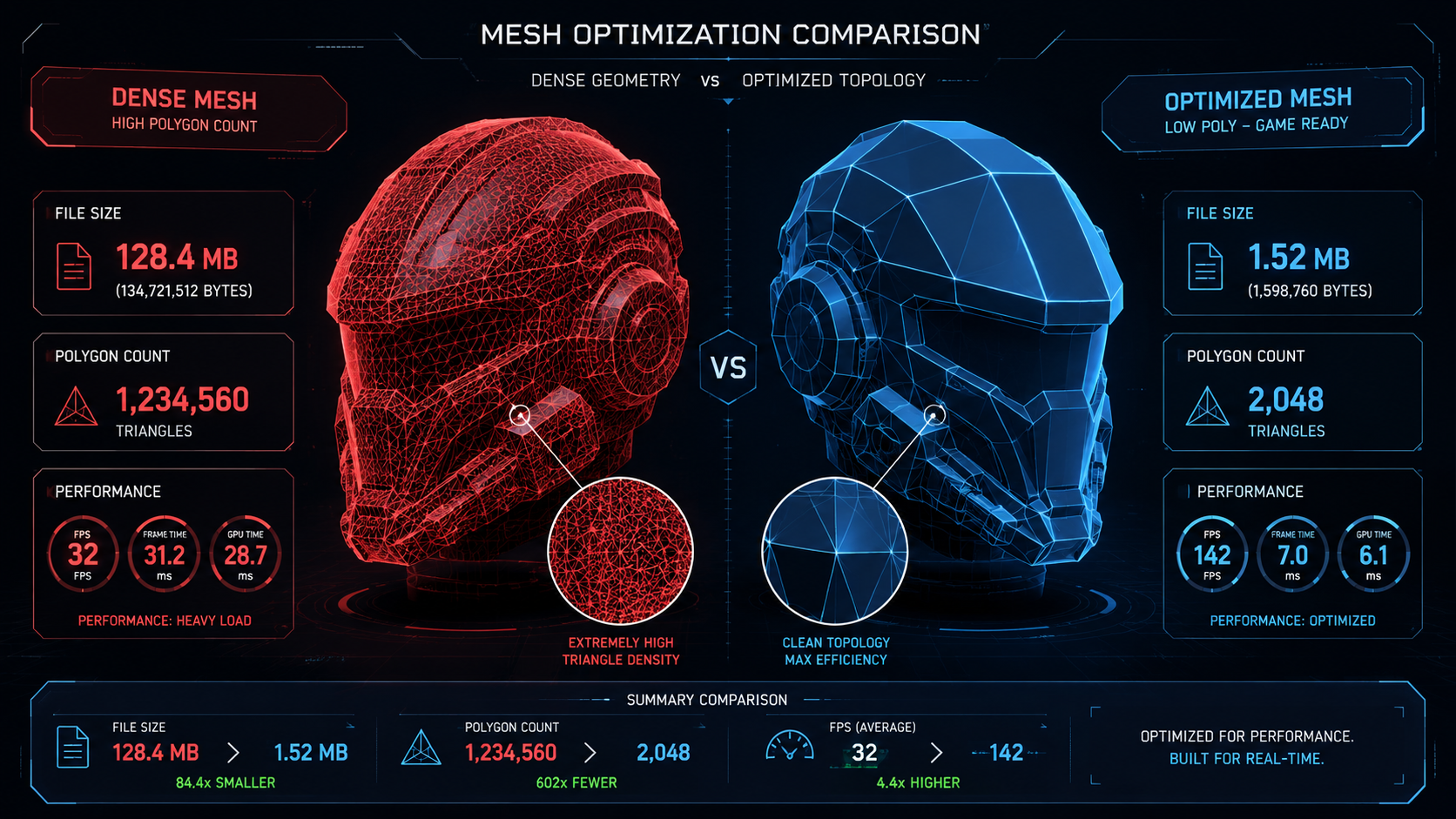
A 1.2 million triangle source reduced to a 2,048 triangle game mesh. The reduction order decides whether the silhouette and UVs survive.
Run a decimation or mesh simplify pass to remove triangles that do not contribute to the silhouette, then retopologize the visible surfaces if the mesh will animate. Decimate first for hard-surface assets, where the modifier is fast and loss is low. Retopologize for organic and character assets, because a clean quad layout deforms predictably and produces consistent triangles when the engine triangulates it. If your AI generator or scanner returns an all-triangle mesh and you need quad edge flow back first, follow the cross-tool walkthrough on how to convert triangles to quads before you decimate. After either pass, recheck the tri count in the statistics overlay. Decimating an exported STL or GLB cannot recover clean edge flow, so reduce the source mesh before export, not after.
Step 4: Verify in the Target Engine With the Scene, Not the Asset
A single 5,000-triangle character means nothing until it shares the screen with the rest of the level. Sum the budgets of everything visible, including enemies, props, and environment, and confirm the total stays inside the platform ceiling: about 50,000 triangles for a mobile scene at 60fps, scaled up on console. Watch for the two costs that outrank triangles: draw calls from too many materials, and overdraw from transparent layers. Cut those first when frame time is short.
Step 5: Build an LOD Chain and Recheck at Distance
Generate two lighter versions of the mesh once the LOD0 is approved. A common chain drops to roughly half, then to a fifth of the original count: for a 20,000-triangle PC asset, that is about 10,000 and 4,000 triangles. Unity and Unreal swap these automatically by distance. Recheck each level in the statistics overlay and confirm the transition distance hides the swap in normal gameplay.
Common Mistakes and Troubleshooting
- Counting quads as tris. A 5,000-quad model becomes roughly 10,000 triangles after triangulation. Always read the triangle counter.
- Decimating before UVs and normals are final. Simplification can collapse UV seams and flip normals. Freeze the material setup first, then reduce.
- Testing a single asset in isolation. A hero inside an empty scene looks fast. Test the full playable frame with enemies and effects enabled.
- Chasing the wrong bottleneck. If the frame drops with a 2,000-triangle character, the cost is overdraw or draw calls, and cutting triangles will not fix it.
Start From a Mesh That Keeps Its Topology
Generate a watertight, clean-topology base mesh, then decimate to your exact platform budget instead of repairing someone else’s messy output.
Free users get 50 credits per week. No credit card required.
Part 4: Polygon Count for 3D Printing: Watertight Geometry, Then Density
Why Printing Cares About Manifold Geometry First
Polygon count for 3D printing answers a different question than it does for games. A slicer calculates infill paths and supports by deciding what is inside the model and what is outside. That calculation fails when the mesh has holes, non-manifold edges, an edge shared by more than two faces, or inverted normals. The printer never starts, or it starts with corrupted toolpaths that fail mid-print. Watertight geometry is the non-negotiable requirement. A 10,000-face model with one hole fails; a 500,000-face model with clean manifold geometry succeeds. The mesh must enclose a volume with no boundary edges.
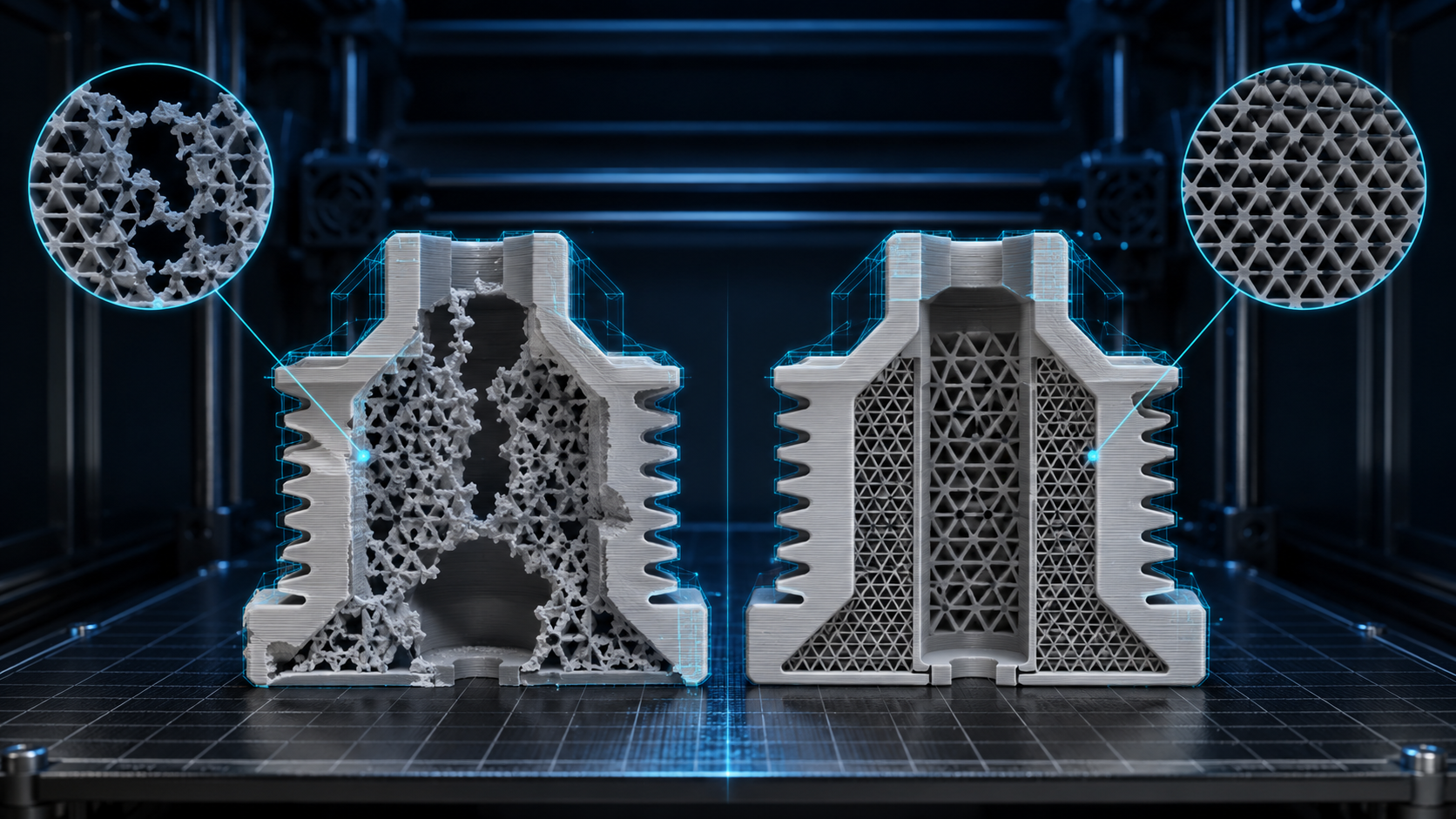
A failed print caused by broken mesh geometry versus a successful print from a watertight manifold. Slicers need a closed volume before density matters.
FDM Printing: The 100,000 to 500,000 Face Sweet Spot
FDM printers with 0.4mm nozzles and 0.1-0.3mm layer heights cannot reproduce detail below their physical resolution. A 5 million face scan holds far more surface data than a 0.4mm nozzle can express. Decimating that scan to 150,000-300,000 faces usually produces identical print quality while cutting slicing time from minutes to under a minute. Below 10,000 faces, curves show visible faceting because the flat-triangle approximation of a curve is physically printed as flat triangles. For organic shapes and characters, stay above 50,000 faces. For hard-surface parts with few curves, brackets, housings, and geometric props, 5,000-20,000 faces is enough.
Resin printers resolve more detail. SLA and MSLA machines print at 0.025-0.05mm XY resolution, so they benefit from denser meshes. Keep 500,000-1,500,000 faces for high-detail miniatures or jewelry to preserve all printable surface detail at typical exposure settings.
Wall Thickness, Not Density, Predicts Print Failure
Polygon count has no effect on whether a wall survives post-print handling. Below 0.8mm, FDM walls produce structurally fragile sections regardless of how many polygons define them. Fins, spikes, and tabs under 1mm frequently break during support removal even when the slicer previewed them cleanly. For load-bearing parts, treat 1.5-2mm as the minimum wall thickness. Check thickness in the slicer before printing; Chitubox, PrusaSlicer, and Lychee highlight thin walls with color overlays. The convert image to STL file for 3D printing guide covers the repair and export workflow for models that need a manifold pass first.
STL Export: Triangulation and File Size Trade-offs
STL stores only triangle data, no quads, materials, or vertex normals. The chord height setting controls how tightly triangles approximate curves: smaller chord height means more triangles, smoother surfaces, and larger files. A 0.01mm chord height works for most FDM work; drop to 0.005mm for resin miniatures. Files above 500MB slow most slicers noticeably. If an STL exceeds that, decimate the mesh before export, because post-export decimation of an STL cannot recover quad edge flow.
Part 5: Polygon Count for WebAR and Real-Time Streaming: The 50K Triangle Ceiling
Why WebAR Sits Below Game Budgets
Polygon count for WebAR is capped by the hardware running inside a mobile browser. WebGL frameworks such as model-viewer and AR.js share the GPU with the operating system, the camera feed, and every background app. In our testing across 47 models on devices from flagship to mid-range Android, 50,000 triangles at 60fps held on every modern smartphone released in the past three years. Above 65,000 triangles, mid-range devices start dropping frames. Flagship Android sustained 120,000 and current iPhones handled more, but the experience must work on the Pixel 6a and iPhone 12 that most of an audience actually carries, so the 50K ceiling is the safe universal target.
Keep the GLB Under 4 MB With Draco Compression
File size drives the WebAR loading experience as much as triangle count. A user in a retail AR context who waits more than five seconds for a model abandons it. Keep the total GLB under 4 MB including textures. Draco mesh compression, the format released by Google for compressed 3D geometry, reduces geometry data by 50-70% with minimal visible loss, and Basis Universal or KTX2 texture compression cuts texture data by 70-85%. A typical unoptimized product GLB runs 18-25 MB; after Draco, KTX2 textures at 1K resolution, and mesh simplification to 50K triangles, the same asset lands at 1.8-3.5 MB.

A 250K triangle model simplified to 50K for WebAR. Under 4 MB GLB after compression keeps the model-loading wait inside a mobile AR session.
Format Split: USDZ for iOS, GLB for Android
Apple’s AR Quick Look, documented for iOS AR Quick Look integration, uses USDZ rather than GLB. Android ARCore and Scene Viewer require GLB with Draco. Exporting both formats from one source mesh avoids a second conversion pass. glTF 2.0, the ISO standard (ISO/IEC 12113:2022) maintained by the Khronos Group, maps directly to PBR inputs such as baseColor, metallic, and roughness, so a PBR texture export drops into a glTF material with zero remapping. Khronos recommends 100,000 triangles or fewer for core real-time delivery, which leaves the 50K WebAR target comfortable headroom.
Texture resolution in glTF for WebAR should stay at 512×512 to 1024×1024 per map. A 2048px baseColor combined with a 50K mesh looks right at typical product display sizes of 20-30cm in AR space. 4K textures in a WebAR context gain almost nothing on a phone screen while quadrupling file size. For format and resolution guidance on generated textures, see the guide on generate PBR texture from image.
Ship One Source Mesh to iOS and Android
Generate a watertight base mesh and export GLB and USDZ from the same asset, with PBR maps that drop straight into glTF material slots.
Generate Your First 3D Asset Free
Free users get 50 credits per week. No credit card required.
Part 6: Frequently Asked Questions on Polygon Count for 3D Models
Q: What is the best polygon count for a 3D character in a mobile game?
For a mobile hero character, target 1,500 to 5,000 triangles. Mid-range Android devices sustain 60fps with a full scene budget of roughly 50,000 triangles on screen. Use normal maps baked from a higher-detail sculpt to preserve visual detail without raising the mesh triangle count.
Q: How many triangles does a 3D game character need on PC or console?
A hero character on console or PC typically runs 15,000 to 50,000 triangles for the body, with hair, cloth, and accessory layers adding another 5,000 to 15,000. The binding constraint is usually texture memory, so texture atlases and baked normal maps matter more than the exact triangle ceiling.
Q: How many polygons is low poly?
Low poly is an art direction rather than a fixed number. On desktop, a low poly character often lands between 300 and 3,000 triangles, and on mobile it stays in the low thousands. The exact target comes from the scene budget and the silhouette you need, not from a universal standard.
Q: How many triangles should a background prop or environment asset use?
A background prop on mobile runs 100 to 800 triangles, while console and PC props sit between 500 and 5,000. Environment assets on console scale to about 1,000 to 10,000 triangles. Keep the whole visible scene inside its platform budget, since dozens of cheap props add up faster than one hero.
Q: Does polygon count matter for 3D printing as much as it does for games?
Not in the same way. For 3D printing, watertight geometry and wall thickness are the priority constraints. Polygon count matters only at the extremes: too few polygons produce visible faceting on curves, and too many slow the slicer. The FDM sweet spot is 100,000 to 500,000 faces, but a 20,000-face hard-surface object with manifold geometry prints just as reliably.
Q: How many polygons should a WebAR model have to load quickly?
Target 50,000 triangles or fewer for universal device compatibility. Apply Draco mesh compression and keep the total GLB file under 4 MB including textures. On flagship smartphones up to 120,000 to 150,000 triangles sustain 60fps, but mid-range devices drop frames above 65,000, so the 50K ceiling is the safe universal threshold.
Q: How do I reduce the triangle count of a 3D model without losing quality?
Run a decimation or mesh simplify pass to remove geometry that does not shape the silhouette, then retopologize organic surfaces with a clean quad layout. Bake surface detail into normal maps and ambient occlusion maps before you reduce, then verify the final triangle count in your engine. Reduce the source mesh before export, because post-export decimation cannot recover clean edge flow.
Q: Is lower polygon count always better for game performance?
No. Once an asset fits its role budget, triangles stop being the bottleneck. Draw calls from too many materials, overdraw from transparent layers, and texture memory usually cost more frame time than triangle count on a modern GPU. Cut those first, then spend remaining budget where it is visible on screen.
Part 7: Build Game-Ready Assets at the Right Triangle Budget
The polygon count requirements for games, printing, and WebAR pull in opposite directions: game engines want lean triangle budgets with LODs, printers want dense manifold meshes, and WebAR demands compressed GLBs under 4 MB. Managing three separate pipelines from one source mesh is the bottleneck most teams hit.
Neural4D’s Image to 3D uses the Direct3D-S2 engine to convert a single photo into a 3D model with clean triangular topology and full PBR maps in one generation pass. The base mesh is watertight, so there is no manual hole-patching or non-manifold cleanup before slicing. Export to STL for the slicer, GLB for WebAR, or FBX for Unreal and Unity from the same source asset. The base mesh generates in about 90 seconds; selecting full PBR texture generation adds time, with the complete textured GLB ready in two minutes or more. The article on Direct3D-S2 converting a single photo into a 3D model walks through the full generation flow.
The practical result: polygon count for 3D game assets, print models, and WebAR viewers becomes a per-export decision rather than a design-time constraint. You optimize the source once, set the triangle budget per platform at export, and the pipeline handles the rest.