The Hidden Cost of “Free 3D Car Models”
(Why You Should Stop Searching)
Searching for a free 3D car model? Here’s why stock repositories cost more than you think, and how Neural4D generates clean, game-ready assets instantly using hard surface AI.
You know the drill.
You need a background vehicle for a street scene. The project budget is tight, and the deadline is tighter. So you open a new tab and type it into the search bar: “free 3D car model.”
Three hours later, you’re still browsing.
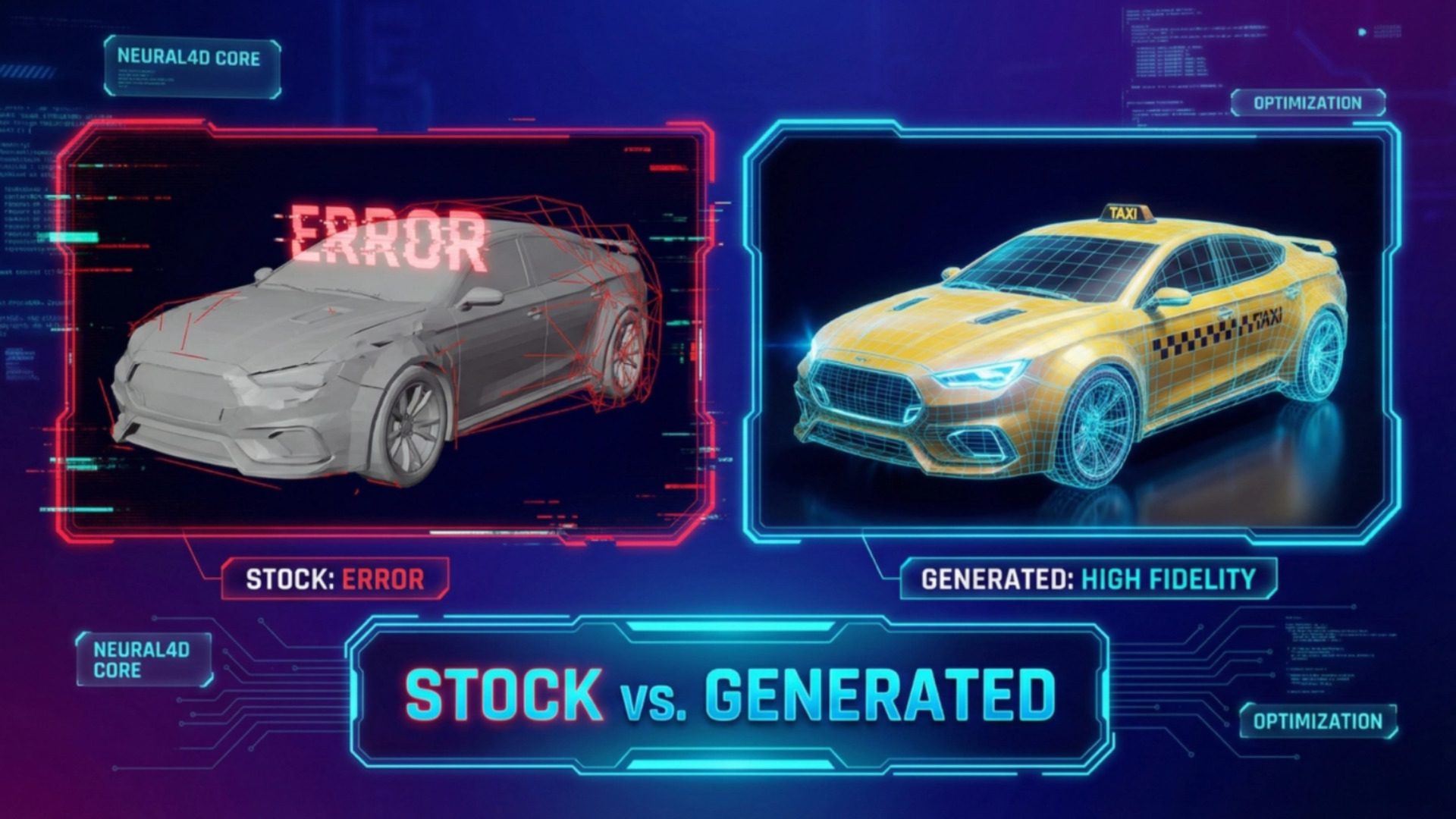
The sedan you found on page 2 looks decent until you switch to the wireframe view, and the topology looks like a spiderweb of chaos. The sports car on page 4 is perfect until you read the fine print: “Editorial Use Only.” The truck on page 10 is usable, but the low-poly style clashes violently with the photorealistic art direction of your environment.
This isn’t just a resource problem. It’s a systemic pipeline failure.
The stock asset ecosystem is a minefield of broken geometry, questionable IP rights, and inconsistent styles. It was built for downloading, not for production. Every minute you spend scrolling through Sketchfab or TurboSquid is a minute you aren’t building your game.
It’s time to stop searching and start manufacturing.
Part 1. The “Zero Cost” Illusion: A Cost Analysis
We need to break the myth that stock assets are free. In professional development, time is currency. Let’s look at the actual math of integrating a “free” asset versus generating one.
Assume a standard 3D artist rate of $50/hour.
| Workflow Step | “Free” Stock Model | Neural4D Generated |
|---|---|---|
| Search & Selection | 2 Hours ($100) Browsing multiple sites, checking licenses. |
2 Minutes (~ $1.60) Typing a prompt. |
| Cleanup / Retopology | 4 Hours ($200) Fixing N-gons, closing holes, UV unwrapping. |
0 Minutes ($0) Native clean topology. |
| Style Unification | 3 Hours ($150) Re-texturing to match game style. |
0 Minutes ($0) Style defined in prompt. |
| TOTAL COST | $450.00 | ~ $1.60 |
That “free” car just cost you $450 in lost productivity. This is why studios are moving away from repositories and toward generative pipelines.
Part 2. The Three Traps of “Free” Repositories
1. The Topology Trap (N-Gons & Non-Manifolds)
Most free models are messy dumps from CAD software or raw photogrammetry scans. They are rarely game-ready assets.
When you import a raw CAD file into Unreal Engine 5 or Unity, the engine struggles. Why?
- N-Gons: Faces with more than 4 sides cause shading errors and rendering artifacts.
- Non-Manifold Geometry: Edges that share more than two faces or vertices that don’t connect properly. This makes the mesh impossible to rig or deform.
- Density Spikes: A simple door handle might have 50,000 polygons, while the rest of the car has 2,000. This destroys your frame rate.
The Result: You become a janitor for someone else’s 3D mesh.
2. The Copyright Nightmare
This is the most dangerous trap for commercial projects. If your “free” Mustang asset looks exactly like a Ford Mustang, you don’t own it. Ford does.
Automotive design is protected by strict trade dress laws. Even if the anonymous uploader on Sketchfab marked the file as “CC0” (Public Domain), they do not have the authority to give you those rights. They are uploading infringing content, and by using it, you are accepting the liability.
The Risk: Your game gets flagged on Steam, or worse, you receive a Cease & Desist letter after launch.
3. The “Baked Lighting” Problem
Many free assets are created using photogrammetry (3D scanning). While realistic, they carry a fatal flaw: Baked Lighting.
The shadows and reflections from the real world are “painted” onto the texture. If you put that car into a night scene in your game, it will still have bright sunlight reflections on the hood. It breaks immersion instantly and is almost impossible to fix without completely re-texturing the model.
Part 3. Why Hard Surface AI Is Different
So, why not just use standard AI generators? Most generative 3D tools are built on “Dense Voxel” technology. They handle organic shapes well, creatures, rocks, mushrooms, because organic shapes can be forgiving.
But cars are unforgiving. They require engineering precision. A car with a wobbly chassis looks like a mistake. A wheel that isn’t a perfect cylinder breaks the physics of your game.
The Organic vs. Hard Surface Divide:
- Organic AI: Treats 3D space like clay. Good for soft forms, bad for sharp edges.
- Hard Surface AI (Neural4D): Treats 3D space like a blueprint. Good for structures, vehicles, and props.
The Neural4D Engine: Direct3D-S2
💡 Technical Insight: Spatial Sparse Attention (SSA)
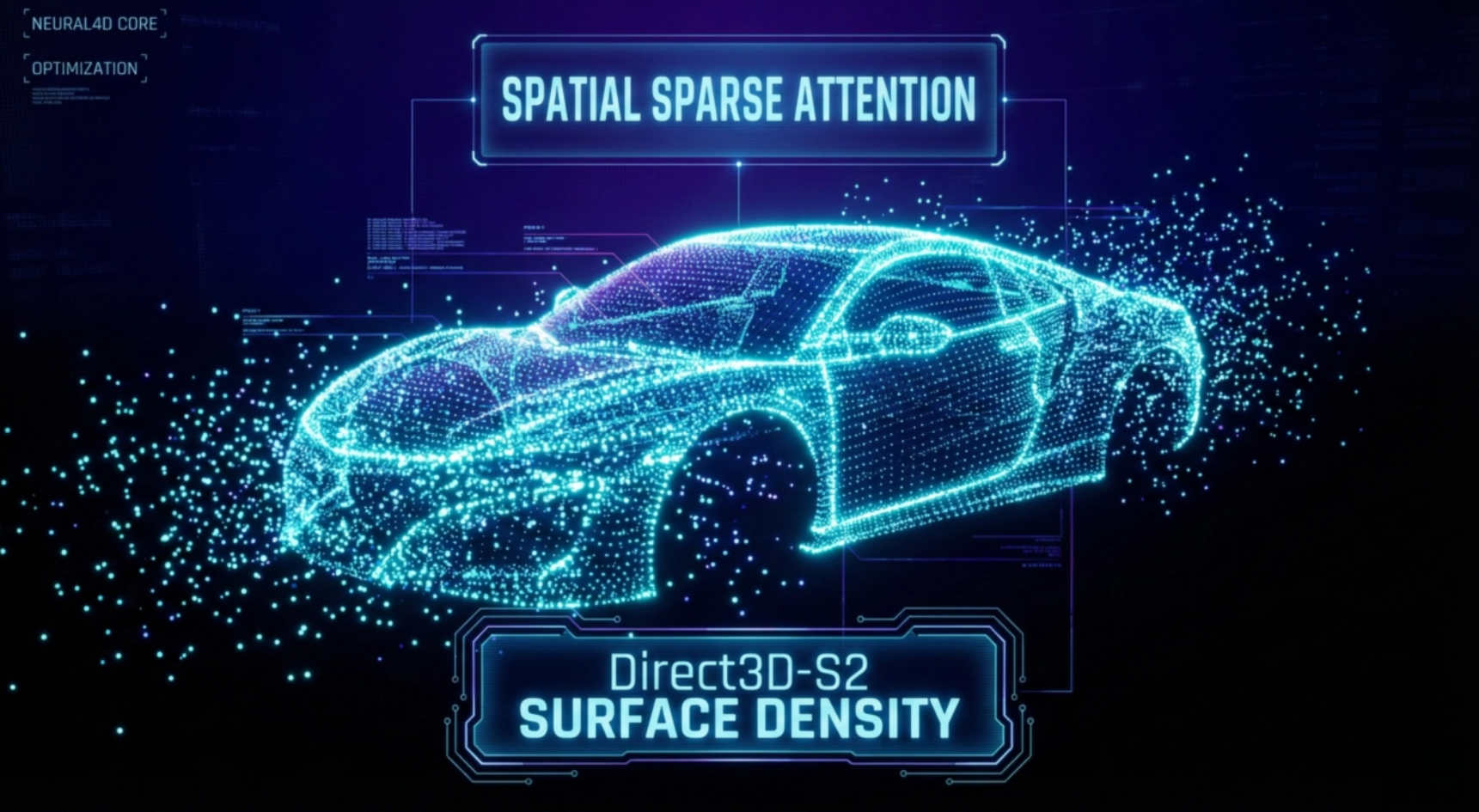
Spatial Sparse Attention (SSA) is the core reason Neural4D produces clean hard-surface meshes.
Traditional volumetric rendering processes the entire 3D bounding box, including the empty air around the object. This dilutes the computational power.
Direct3D-S2 uses a sparse volume architecture. It identifies where the surface exists and concentrates 100% of the compute density only on that shell.
- Higher surface precision: No wasted compute on empty air allows for higher polygon density where it matters.
- Sharper edge definition: It creates a distinct separation between glass and metal, rather than blending them.
- Watertight output: The algorithm ensures the mesh is closed and structurally sound, ready for auto-rigging.
Part 4. From “Search” to “Prompt”: A New Workflow
Instead of hunting for a “cyberpunk taxi” and settling for a “sci-fi sedan,” you simply define exactly what you need.
- Input: “Battered yellow taxi, cyberpunk style, hover conversion, matte finish, heavy rust.”
- Generate: Direct3D-S2 processes only the active sparse volume, iterating on the geometry.
- Output: A unique, royalty-safe, watertight asset in .OBJ or .FBX format.
Read also: Text to 3D Model AI: Can Prompts Really Create 3D Models?
What you get with this workflow:
- Royalty-Free Safety: It’s a generic design generated by AI, avoiding the “Ford Mustang” trademark trap.
- Style Consistency: You can reuse the “Cyberpunk, heavy rust” prompt structure across an entire fleet (bus, truck, bike) to ensure they look like they belong in the same world.
- Production Ready: The topology is clean enough for immediate import into Unity or Unreal Engine without a cleanup pass.
Starting with a concept sketch or photo instead of text? Learn the alternative workflow in our guide on
How to Convert Image to 3D Model Using AI.
Frequently Asked Questions
Q: Can I sell the 3D models I generate with Neural4D?
Yes. Unlike many “Editorial Use” free assets, you own the commercial rights to any asset you generate on the paid tier of Neural4D. You can use them in sold games, or even sell the assets themselves.
Q: Are the models rigged for animation?
The models are generated as static meshes with separated wheels (if specified). Because the topology is clean and watertight, they work seamlessly with auto-rigging tools like Mixamo or AccuRIG.
Q: How does this compare to Photogrammetry?
Photogrammetry creates heavy, unoptimized meshes with baked-in lighting. Neural4D creates optimized, neutral meshes that react properly to your game’s lighting engine.
The New Definition of “Free”
Neural4D offers a free tier. But the real value isn’t the price tag. It’s the control.
With stock repositories, you search and compromise. With N4D, you define and generate.
The inventory doesn’t run out. The style doesn’t drift. The topology doesn’t collapse.
Stop digging through the internet’s leftovers looking for a free 3D car model.
Build Your Fleet Today
Generate production-ready hard surface assets in seconds.
✓ No credit card required • ✓ Instant generation