Use Claude Code with Neural4D API: Automate Your 3D Asset Pipeline
Quick Summary
- Learn to integrate Neural4D API with the 2026 Claude Code CLI for hands-free 3D generation.
- Leverage SSA Architecture and Direct3D-S2 to generate base meshes in under 90 seconds.
- Connect Neural4D assets directly to Blender and Fusion via the new Claude Connectors.
- Ensure production-ready exports with quad-dominant topology and watertight geometry.
The landscape of 3D asset creation has shifted from manual sculpting to automated generation. For developers building game engines, VR environments, or digital twins, the ability to Use Claude Code with Neural4D API provides a critical competitive edge by bridging high-level reasoning with industrial-grade 3D geometry.
· Part 2: The Developer’s Edge: Speed vs. Geometry Quality
· Part 3: Why Claude Code CLI is the Perfect Orchestrator for Neural4D
· Part 4: Implementing the Automation: POST /api/generateModelWithText
· Part 5: Handling Asynchronous Tasks with Claude Code DAGs
· Part 6: Professional Export: Quad-Dominant Topology and Watertight Output
· Part 7: Frequently Asked Questions (FAQ)
· Part 8: Start Automating with Neural4D Today
Part 1: The Connector Era: Seamlessly Feeding Blender & Fusion with Neural4D
The recent announcement of Claude for Creative Work (April 28, 2026) marks a paradigm shift in how developers interact with 3D design software. With the release of Claude Connectors for Blender and Autodesk Fusion, the “manual handoff” is officially dead.
By choosing to Use Claude Code with Neural4D API, you are no longer just getting a file; you are generating a professional-grade asset that Claude can directly “inject” into your working scene. Imagine prompting: “Generate a high-fidelity robot arm in Neural4D and import it into my active Blender collection.”
This integration ensures that Neural4D’s industrial-grade geometry is leveraged where it matters most—inside the tools professionals already trust. Claude acts as the intelligent bridge, using Neural4D as its primary high-fidelity asset factory.
Part 2: The Developer’s Edge: Speed vs. Geometry Quality
Traditional AI 3D generators often produce what developers call “Triangle Soup” – a mess of non-manifold geometry that requires hours of cleanup. When you Use Claude Code with Neural4D API, you bypass these legacy issues. Neural4D uses Direct3D-S2, an engine capable of generating watertight meshes that are ready for immediate engine import.
Speed is the second pillar of efficiency. Neural4D generates a base mesh in approximately 90 seconds. While competitors struggle with high-latency cloud rendering, the Neural4D SSA architecture (Spatial Sparse Attention) optimizes GPU memory usage, allowing for gigascale 3D generation without the typical hardware bottlenecks. By automating this with Claude Code, developers can batch-process hundreds of assets in the background.
Note: While the base mesh generation takes only 90 seconds, high-fidelity texturing via Neural4D-2.5 requires additional processing time to ensure PBR material accuracy.
Part 3: Why Claude Code CLI is the Perfect Orchestrator for Neural4D
The 2026 iteration of Claude Code CLI introduces advanced remote-control and terminal automation features. Unlike basic scripts, Claude Code can reason about terminal output and handle failures dynamically. This makes it ideal for managing the asynchronous nature of the Neural4D API.
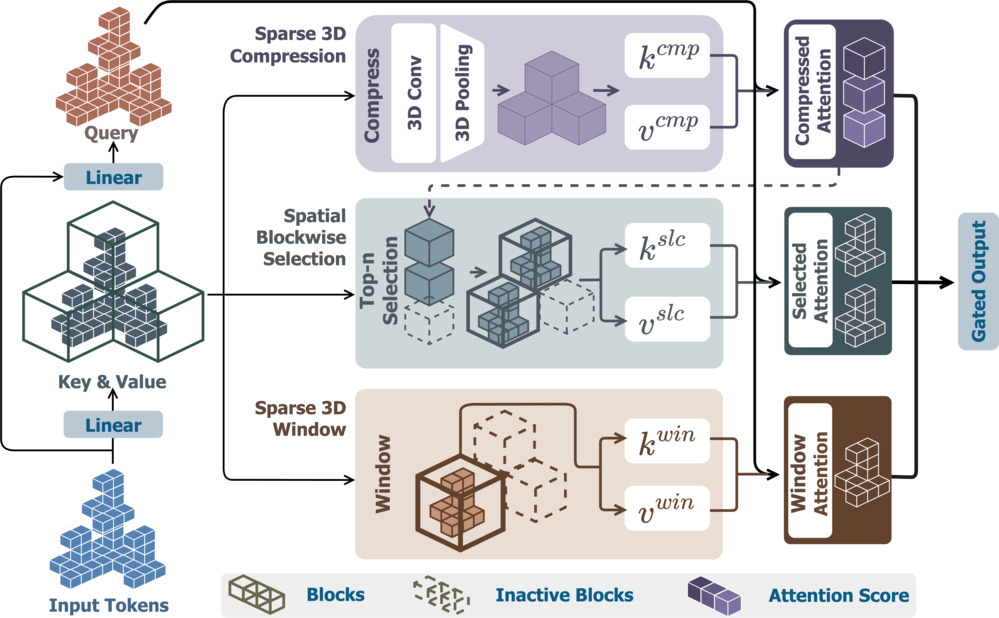
The Neural4D SSA architecture optimizes spatial attention for rapid mesh generation.
Technical Edge: SSA Architecture and Direct3D-S2
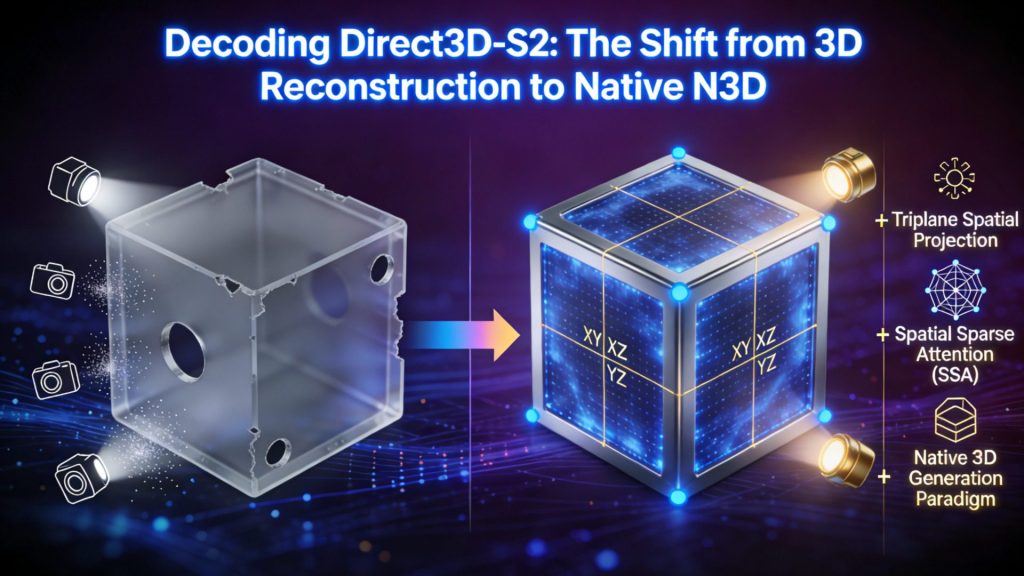
The SSA (Spatial Sparse Attention) mechanism is the core of the Direct3D-S2 framework. It solves the cubic complexity of 3D generation by selecting spatially consistent blocks for attention. For developers, this means the API can handle complex prompts like “cyberpunk vehicle with exposed wiring” without crashing or producing disconnected parts.
When using Claude Code, you can instruct the agent to “Initialize the Neural4D environment and check for API connectivity.” Claude can then verify your Bearer Token and ensure the base URL is reachable before launching a high-volume generation task. For a deeper dive into the underlying technology, see our guide on Decoding Direct3D-S2.
Part 4: Implementing the Automation: POST /api/generateModelWithText
Automating the Neural4D endpoint requires handling JSON body parameters precisely. The primary endpoint, /api/generateModelWithText, accepts three main parameters. Claude Code can be used to script these requests using curl or a Python client, managing the response payload effectively.
# Example Claude Code Command
claude “Request a 3D model of a ‘Steampunk Aviator Goggles’ from Neural4D API, modelCount: 1, disablePbr: 0, and save the UUIDs to a log file.”
For those building full-scale integrations, our Neural4D 3D Model API User Guide provides comprehensive steps for local environment configuration and polling logic.
Part 5: Handling Asynchronous Tasks with Claude Code DAGs
One of the biggest challenges in AI 3D pipelines is managing the wait time between request and completion. Neural4D returns an array of uuids immediately, but the model generation happens asynchronously. This is where Claude Code’s 2026 task persistence becomes invaluable.
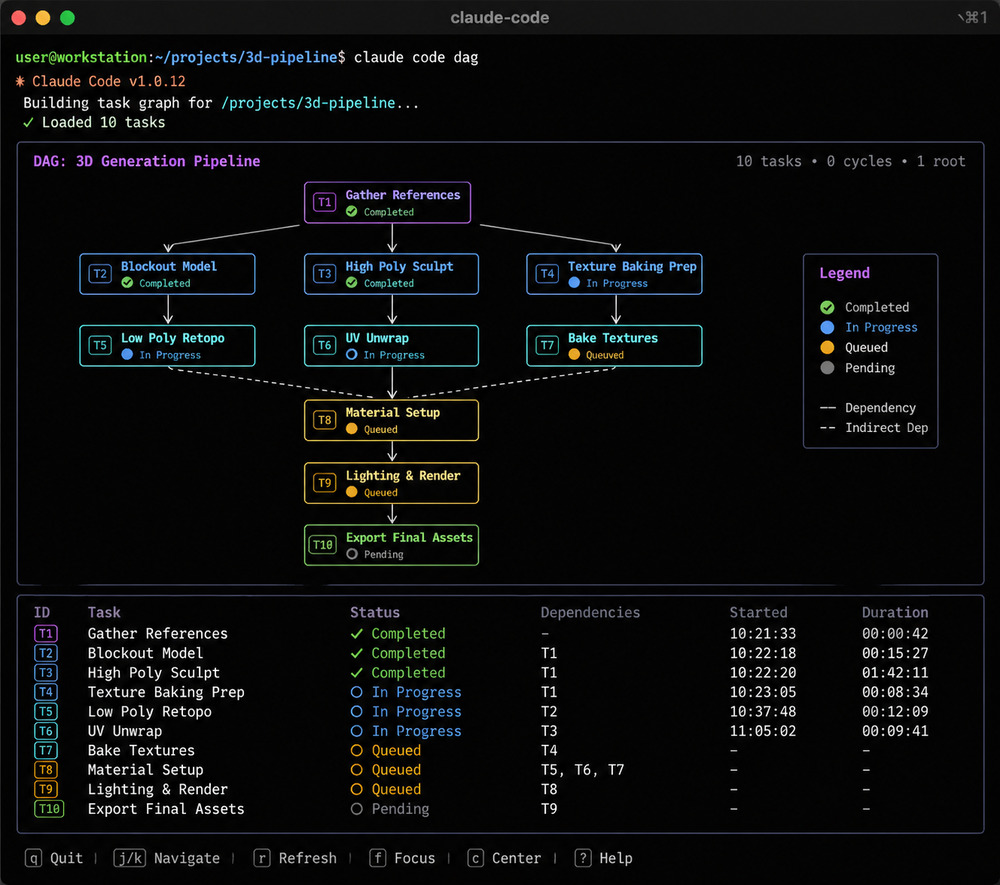
Claude Code stores task states in a DAG, allowing for crash-resilient polling of the Neural4D API.
Crash-Resilient Polling Logic
Claude Code stores task states in ~/.claude/tasks/. If your terminal crashes while waiting for a 3D model, the agent can resume from the exact point of failure. You can instruct Claude to poll the Neural4D status endpoint every 30 seconds and only alert you when the models are ready for export.
85%
Reduction in manual topology cleanup using Neural4D vs. competitors.
40%
Expected share of AI-generated assets in the 3D gaming market by 2026.
Part 6: Professional Export: Quad-Dominant Topology and Watertight Output
When you Use Claude Code with Neural4D API, the final product isn’t just an image — it’s a high-fidelity 3D model. Unlike raw VDB or Gaussian Splatting exports, Neural4D focuses on quad-dominant topology. This means the mesh is structured with four-sided polygons, which is the industry standard for clean subdivision and rigging. For a head-to-head analysis of this technology, check our latest Neural4D vs. Meshy topology comparison.
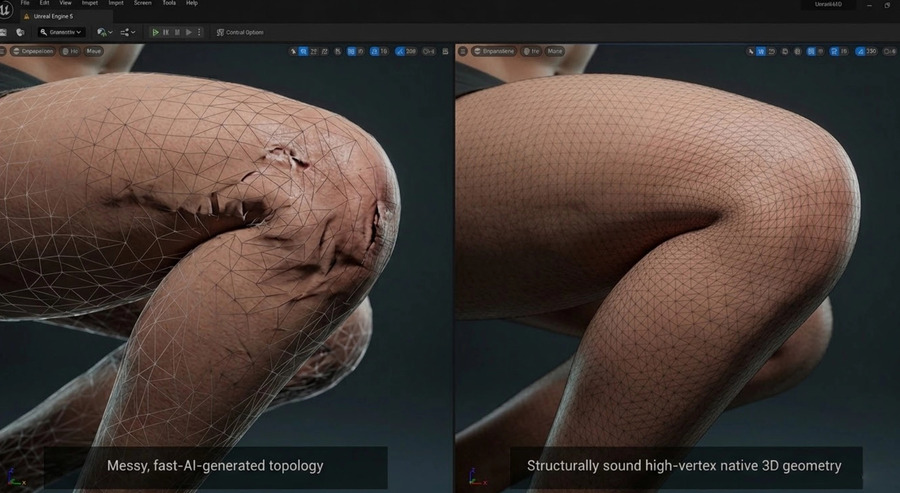
Neural4D provides watertight, quad-dominant meshes ready for professional rigging.
Furthermore, the watertight nature of the geometry ensures that there are no holes or overlapping faces. This is critical for 3D printing and physics simulations. If you are focused on manufacturing, refer to our Text-to-STL guide for production settings.
Part 7: Frequently Asked Questions (FAQ)
Q: Does the Neural4D API support batch generation?
A: Yes. You can use the modelCount parameter to generate up to 4 variations per request, or use Claude Code to loop through a prompt list for massive batch processing.
Q: What file formats are available via the API?
A: Neural4D supports standard formats including .glb, .fbx, .obj, and .stl. For professional workflows, .glb is recommended for its PBR support.
Q: How do I handle 529 Overloaded errors in Claude Code?
A: If Claude Code encounters a 529 error while processing API results, use the /model command to switch to a lower-latency model or run claude update to ensure you are on v2.1.111+.
Q: What is the cost per generation for the Neural4D API?
A: A standard Text-to-3D generation consumes 60 points. With an entry Plus plan at $6.9/month, the cost per high-quality production asset is significantly lower than manual modeling fees.
Q: Can I refine a model via the API without starting over?
A: Yes. The Neural4D-2o endpoint allows for dialogue-based mesh refinement. You can instruct the API to “thin the edges” or “improve texture resolution” on an existing UUID.
Q: Is there a way to automate the Blender import process?
A: Absolutely. By using the Claude Blender Connector (MCP), you can automate the entire chain: Generate via API -> Process UUID in Claude Code -> Execute Blender Python script for import.
Part 8: Start Automating with Neural4D Today
Ready to transform your 3D production? By choosing to Use Claude Code with Neural4D API, you are investing in a future where high-quality 3D assets are generated in seconds, not days.