How to Add Video to Amazon Listing: An AI Seller’s Guide
Quick Summary
- Amazon’s own internal data measures an average 23.8% sales increase and a 40% reduction in returns once a shoppable video is added to a detail page.
- A shoppable video runs 1 to 12 minutes in MOV or MP4 up to 5 GB at up to 1080p, in either 16:9 or 9:16. Amazon recommends aiming for 30 to 60 seconds.
- Brand Registry is not required for the main image block. Any seller with a Professional account, three or more months of selling history, and live listings can upload through the Manage videos page.
- Every video containing photorealistic AI-generated people must carry the contains-synthetic-performer keyword in its XMP metadata before upload.
- Neural4D Video Generation renders product clips from a text prompt, optionally anchored to an uploaded reference image of the real SKU, for roughly the cost of one stock-video license per SKU.
Amazon gives every product detail page a video slot, and Amazon’s own numbers say it pays: detail pages carrying a shoppable video sell more and get returned less. The only real question is how to add video to Amazon listing pages without a five-figure shoot per SKU. AI generation answers it. A text prompt replaces the studio, and a render cycle measured in minutes replaces the production week.
Table of Contents
- Part 1: Why Amazon Listing Videos Outperform Static Images
- Part 2: Producing the Video with AI in Under 10 Minutes
- Part 3: How to Add Video to Amazon Listing
- Part 4: Amazon’s Video Specs and What AI Output Must Match
- Part 5: Scripting Prompts That Convert (Product Video Patterns)
- Part 6: Common Questions About Amazon Listing Video
- Conclusion
Part 1: Why Amazon Listing Videos Outperform Static Images
The case for listing video no longer rests on third-party surveys. Amazon publishes its own performance data in the Shoppable Video Getting Started Guide, and those figures come from Amazon’s internal measurement rather than from a vendor with something to sell.
Across US detail pages, adding a shoppable video produced an average 23.8% increase in sales and an average 40% reduction in customer returns. The sales figure covers January through December 2024, and the returns figure covers January through June 2024. A separate Wyzowl consumer survey points at the mechanism behind that lift, finding that 85% of people have been convinced to buy a product or service by watching a video.
The returns reduction is the underrated half of that pair. A returned unit costs the seller inbound freight, Amazon’s return processing, and lost buy box time, and video prevents the return by showing scale, fit, and function before purchase. For a private-label seller doing $50,000 a month per SKU, a 23.8% lift is roughly $11,900 in incremental monthly revenue per listing.
📊 Why most sellers still skip video
A traditional product video shoot runs $500 to $2,000 per SKU when you include a videographer, lighting, props, and one round of edits. For a catalog of 50 SKUs that is a $25,000 to $100,000 line item, which is why most private-label sellers never get video onto more than a handful of their listings. AI generation removes the studio from that line item entirely.
Where the Video Sits in the Listing
Amazon places an approved shoppable video in three surfaces: the main image block, the videos section below the fold on the product detail page, and search results. The main image block is the valuable one, because a shopper scrolling past the first image meets the video before the bullet points or the A+ content.
Mobile shoppers see the first frame before they tap anything, so the opening two seconds decide whether the clip plays at all. Lead with the product in motion and hold the branded end card for the last second.
Related Video Shorts: The Slots You Do Not Control
The detail page also carries a related video carousel, and that carousel is not seller-exclusive. It mixes brand uploads with videos from Amazon Influencer Program creators and from customers who attach video to a review. Amazon decides which of those videos surface on your ASIN, so a creator clip can occupy a visible slot that your own upload does not.
Two consequences follow. The shoppable video you upload through Seller Central is the only placement you fully control, which makes it the one worth producing first. And because creator videos cross ASINs, the related slots on your own detail page are not a closed system: the same mechanism that lets a creator clip appear under your listing lets one appear under a competitor’s.
Part 2: Producing the Video with AI in Under 10 Minutes
The production workflow has three stages: write the prompt, generate the clip, then assemble the final file. With Neural4D Video Generation, the text prompt is the required input, and an optional reference image can be uploaded alongside it to anchor the product’s look. There is no camera setup, no model release, and no edit timeline to manage.
Stage 1: Write the Prompt
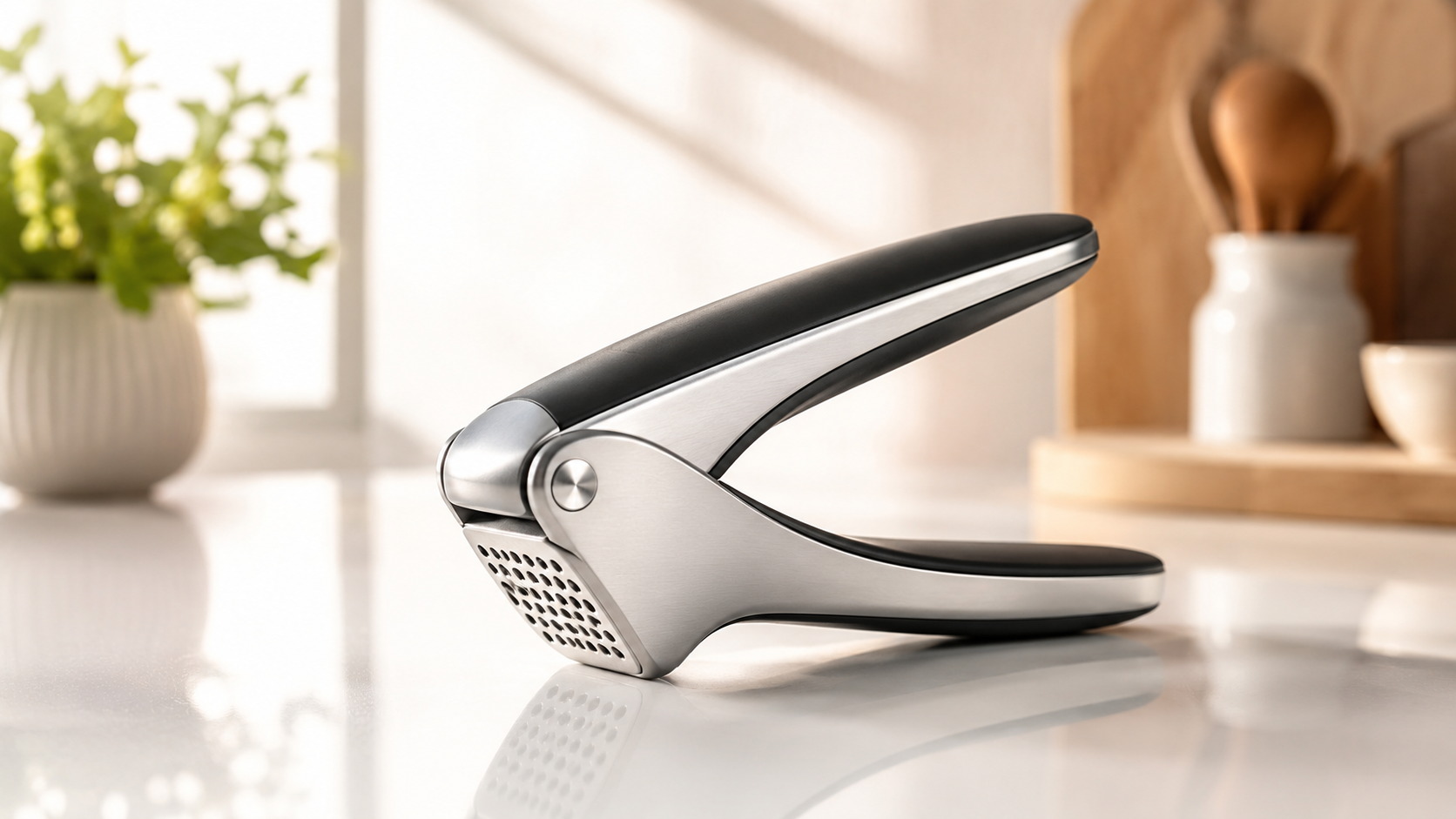
A converting product-video prompt has four parts: the product, the action, the visual style, and the camera move. Example for a kitchen-gadget listing: “Stainless steel garlic press on a marble countertop, hand squeezes a single garlic clove, juice and pulp drop into a small ceramic bowl below, warm overhead kitchen lighting, slow push-in camera move, photorealistic, 16:9.” That prompt structure carries every signal the AI needs to render a recognizable product clip.
Stage 2: Generate the Clip
Submit the prompt and wait for the render. Most cloud text to video models return a clip in under two minutes. The output runs 4 to 10 seconds, so set the aspect ratio to 16:9 to match the main image block, even though Amazon’s spec accepts both 16:9 and 9:16.
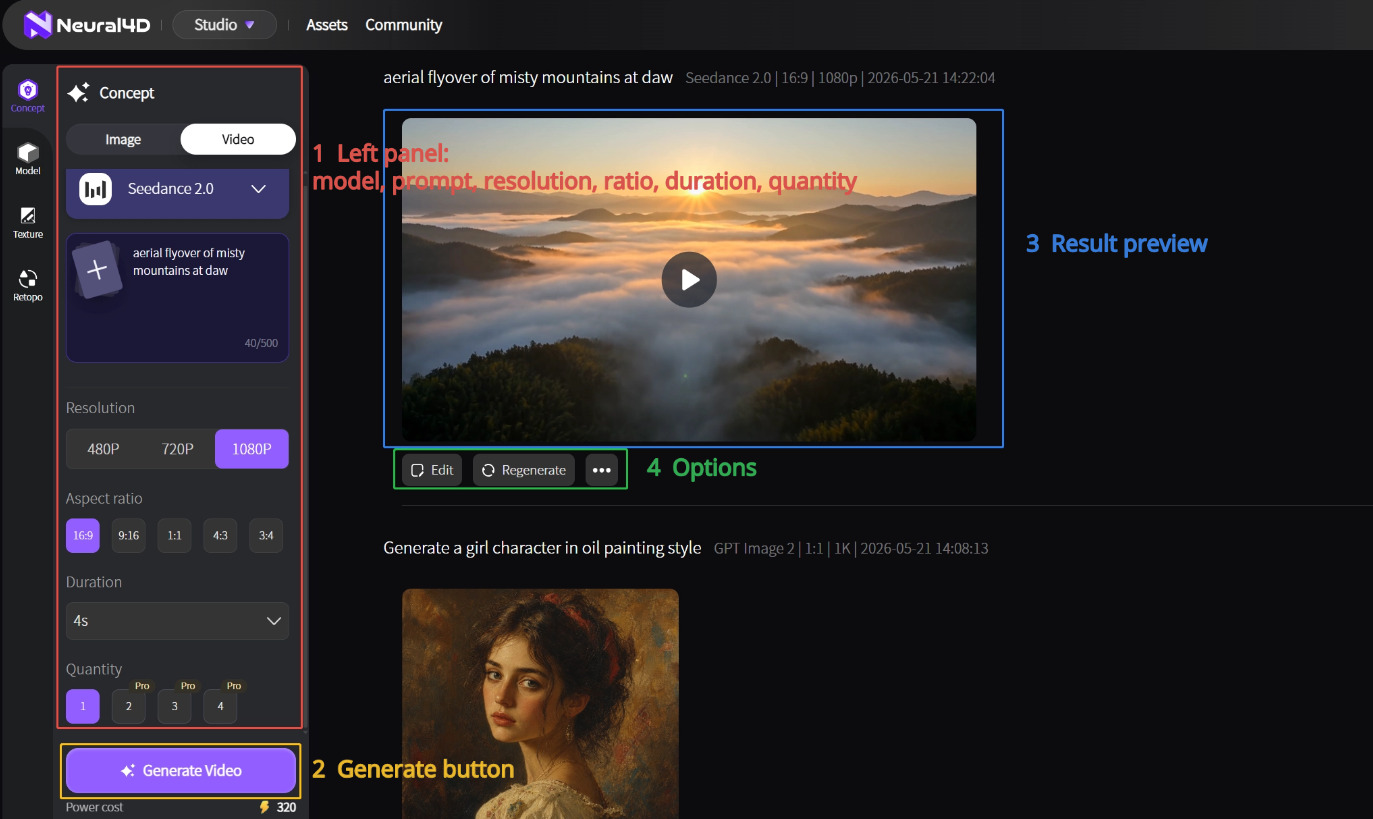
See the how to use Text to Video walkthrough for the exact interface steps. Keep the prompt centered on the product’s primary benefit and avoid background clutter, which is the raw material for most rejection-causing artifacts.
Stage 3: Stitch and Polish
One AI clip is rarely a full listing video on its own. Sellers generate three to five short clips (hook shot, feature shot, lifestyle shot, packaging shot, end card) and stitch them in a free editor like CapCut or DaVinci Resolve. Add a 1- to 2-second branded end card with logo and tagline; Amazon allows brand watermarks but not contact information.
For a longer-form e-commerce video that covers the full benefit story, the same prompt-and-stitch approach scales. The text to video workflow for e-commerce breaks down the longer-format structure.

Part 3: How to Add Video to Amazon Listing
Uploading is a short sequence inside Seller Central, and Amazon documents the requirements on its own Upload a video help page. Two things decide how the process goes: whether your account clears the eligibility bar, and whether you already have Brand Registry. Eligibility decides whether you can upload at all. Brand Registry decides how many surfaces the video can reach.
Who Is Eligible to Upload a Shoppable Video
The bar is lower than most sellers assume. An Amazon moderator confirmed on the Seller Forums that the tool is open to “brand registered and not brand registered sellers that have been selling for three months or more,” provided the products are live.
That leaves three conditions: a Professional selling account, at least three months of selling history, and active listings. Accounts short of the three-month mark do not see the option at all, which is why newer sellers often assume video is gated behind Brand Registry when it is not.
Uploading Through Seller Central: The Official Path
Amazon’s Shoppable Video Getting Started Guide lays the process out in four steps.
- Sign in to Seller Central, open the Products tab, and click Manage Products.
- Select the Manage videos page to open your video library and performance dashboard.
- Click Upload video(s) and drag your files in. Up to 15 videos can go at once, then add a title and select the related ASIN(s).
- Submit for moderation. Approved videos appear on detail pages within 1 to 3 days.
Two details save time on a large catalog. Amazon provides an Include ASIN(s) product variations toggle, which shares one video across every variation of a parent product without a second upload. And the video library doubles as a reporting surface, tracking views, click-through rate, attributed sales, and return rate for each video.
What Brand Registry Actually Unlocks
Brand Registry is not the gate to listing video, but it is still worth having. It controls the placements beyond the main image block: video modules inside A+ Content, video in your Brand Store, and Sponsored Brands Video ads. Those are additional surfaces rather than the base capability, and they are the reason a brand-registered seller gets more reach out of the same render.
Where AI video actually gets refused: Amazon’s rule is that the media must accurately represent the product a customer receives, and AI generation is the one production method that can violate it silently. A model can invent a button, shift a brand color, or render a logo that never existed on the SKU. Generate from a reference image of the real product and review every frame before you submit.
Adding Video to A+ Content and Brand Story
A+ Content is a separate placement from the main image block, and it takes video through its own modules rather than through the Manage videos library. Upload the file in A+ Content Manager, place it in a video-capable module, and Amazon reviews the module with the rest of the A+ submission. A single clip can sit in an A+ module and in the detail page carousel at the same time, which is the cheapest reach you get from one render.
A+ video also falls under Amazon’s AI disclosure rule, and A+ Content Manager hands you a shortcut the rest of the listing does not get: tick the AI-generated people checkbox when you upload creative assets and Amazon applies the required metadata for you. Everywhere else, you tag the file yourself before upload.
Your First Amazon Video, Generated Today
Skip the studio. Text prompt in, listing-ready clip out, ready for Seller Central upload.
Free users get 50 credits per week. No credit card required.
Part 4: Amazon’s Video Specs and What AI Output Must Match
Every upload has to pass Seller Central’s validation against a fixed spec sheet. AI tools generate at varying aspect ratios and bitrates by default, so lock the right settings before you generate rather than after. The authoritative copy of these numbers lives on Amazon’s Shoppable video guide, which Amazon updates without notice.
| Spec | Amazon Requirement | What to Set in Your AI Tool |
|---|---|---|
| File format | MOV or MP4 | Export as MP4 H.264 from the stitch editor |
| Aspect ratio | 16:9 or 9:16 | Generate the master at 16:9 for the main image block, then crop a 9:16 cut for vertical placements |
| Resolution | Up to 1080p | Request 1080p output; exporting above it adds file weight without adding displayed quality |
| Duration | 1 to 12 minutes, with 30 to 60 seconds recommended | Render 4 to 10 second clips and stitch three to five of them into the final cut |
| Maximum file size | 5 GB | Stay under 500 MB for upload reliability |
| Thumbnail | JPEG, PNG, GIF, or BMP under 5 MB, at 1920 by 1080 in 16:9 | Export a still from the strongest frame or generate one with AI product images for e-commerce |
| Bulk upload | Up to 15 videos at once | Batch a full catalog refresh into a single session |
| Review time | 1 to 3 days after moderation | Submit ahead of a launch date, not on it |
| AI disclosure | Required when the video shows photorealistic AI-generated people | Tag the file with contains-synthetic-performer before upload (see the next section) |
| Sponsored Brands Video | 6 to 45 seconds, 16:9 square pixel only, 500 MB maximum | Cut a separate short version; the detail page master will not pass |
Content Policy Limits
Amazon’s video content policy rules out pricing and promotional language, competitor references, external URLs and social handles, unsupported claims, and on-screen customer reviews. AI generation makes the pricing-claim risk especially acute, because a model can render a price overlay into the frame without being asked. Scrub every output frame by frame for text you did not write.
The AI Disclosure Rule Every AI Video Has to Satisfy
Amazon now requires sellers to label video and imagery that contains photorealistic AI-generated people. The obligation takes the form of a metadata tag rather than a visible watermark, and Amazon states that it applies to listings and A+ content in every worldwide store. Amazon introduced the rule because recent legislation requires disclosure when images or videos in advertisements contain photorealistic AI-generated people.
The mechanism is exact. Amazon’s Seller Forums announcement states that sellers “must use an IPTC-compatible metadata editor to add the keyword contains-synthetic-performer to the dc:subject (XMP) field of your image or video files before adding them to your listings and A+ content.” Amazon then adds a customer-facing indicator to the tagged media. Detailed instructions sit on Amazon’s How to tag media that contains an AI-generated person help page.
The tag applies only when the people in the video are photorealistic and entirely AI-generated. Amazon lists four cases where no tag is needed: media that features only real people, even if AI tools altered them; characters from films, television, streaming, documentaries, video games, or other expressive works; media with no people at all; and media whose people are not photorealistic.
The tag has to be applied before upload, which makes it the most common gap in AI video workflows: the generation tool hands you the file long before anyone opens a metadata editor. Adding the keyword afterwards means re-exporting the asset and uploading it again.
Part 5: Scripting Prompts That Convert (Product Video Patterns)
The single biggest lever for AI product video quality is the prompt itself. Four prompt patterns reliably produce listing-ready output, and pattern selection depends on what the product needs to demonstrate.
Pattern 1: Hero Hold (Best for Aesthetic Products)
Use for jewelry, cosmetics, watches, and anything where surface finish sells. Prompt template: “[Product] on [surface], slow rotating turntable, soft three-point studio lighting, shallow depth of field, photorealistic, 16:9.” The camera does the work; the product just exists in space.
Pattern 2: Action Demo (Best for Tools and Gadgets)
Use for kitchen tools, fitness equipment, and anything mechanical. Prompt template: “[Product] in use, hands operating the [specific feature], close-up on the action, top-down lighting, photorealistic, 16:9.” Show the value prop happening in real time.
Pattern 3: Lifestyle Context (Best for Home and Apparel)
Use for furniture, decor, and clothing. Prompt template: “[Product] in [natural setting], soft window light, person in frame using it casually, warm color grade, photorealistic, 16:9.” The product is part of a scene, not the subject of a studio shot.
Pattern 4: Problem-Solution (Best for Health and Cleaning)
Use for supplements, cleaning products, and pain-relief items. Prompt template: “Split-screen showing [problem state] on the left and [resolved state] with the product on the right, even lighting, photorealistic, 16:9.” Visual before-and-after compresses the entire pitch into five seconds.
The Six Formats Amazon Says Drive Results
Amazon’s own guidance names the video formats that work on detail pages: How-To, Brand Story, Unboxing, Troubleshooting, Product Overview, and Product Setup. The four prompt patterns above map onto those formats, so pick the pattern that produces the format your listing is missing.
Amazon’s advice on length is equally direct, recommending 30 to 60 seconds as enough time to highlight key benefits and answer common customer questions. Customers watch in order to make a quick decision, which makes the 12-minute allowance a ceiling rather than a target.
Where Neural4D Fits
Neural4D Video Generation runs on the same four-part prompt structure as the patterns above. The text prompt is the required input, and a reference image of the real SKU can be uploaded alongside it to anchor color, shape, and finish. Output is an MP4 file, which drops into Seller Central without a transcode.
Anchoring the render to a reference image of the actual product is the most reliable way to keep the clip faithful to the ASIN. Product appearance that drifts from the listing photos is the failure mode behind most AI video rejections, and a reference image narrows that gap before you ever reach a frame-by-frame review.

Scaling Beyond Amazon
The same AI clips repurpose to other channels with light editing. Crop the 16:9 master to 9:16 for TikTok, Reels, and Shorts, or to 1:1 for a feed post. The AI video for TikTok guide covers the platform-specific edits. If your catalog also lives on Shopify, pair the video with a 3D viewer using the Shopify 3D listing guide.
Part 6: Common Questions About Amazon Listing Video
Q: How long can a video be on an Amazon listing?
Amazon’s shoppable video spec allows 1 to 12 minutes with a 5 GB maximum file size, but Amazon’s own guidance recommends aiming for 30 to 60 seconds. AI text to video tools produce 4 to 10 second clips, so a polished listing video is three to five AI clips stitched together rather than one continuous render. Sponsored Brands Video ads run on a separate spec of 6 to 45 seconds.
Q: What video aspect ratio does Amazon accept for product listings?
Amazon’s shoppable video spec accepts both 16:9 horizontal and 9:16 vertical. The main image block displays 16:9, so generate the master at 16:9 and crop down for vertical placements. Cropping down keeps the subject centered, while upscaling a 9:16 clip to 16:9 always cuts the subject out of frame. Sponsored Brands Video is stricter and accepts 16:9 square pixel only.
Q: Does Amazon require me to disclose that a video is AI-generated?
Yes, when the video shows photorealistic people who were entirely generated by AI. Amazon requires the keyword contains-synthetic-performer in the dc:subject (XMP) field of the file before upload, and then adds a customer-facing indicator to the media. No tag is needed for videos with no people, videos with only real people, videos where the people are not photorealistic, or videos featuring characters from films, games, and other expressive works.
Q: Can I add video to Amazon A+ content?
Yes, through the video-capable modules in A+ Content Manager rather than through the Manage videos library. The two placements are independent, so one render can sit in an A+ module and in the detail page carousel at the same time. A+ Content Manager also gives you an AI-generated people checkbox that applies the required disclosure metadata automatically during upload, which saves the manual tagging step.
Q: Can I use AI-generated video on Amazon if it shows my product?
Yes, provided the rendered product accurately represents what the customer receives. Amazon’s requirement is accurate representation rather than a particular production method, so AI output is acceptable as long as it does not invent features, colors, or packaging. A model that renders a button or a logo the real SKU does not have turns a compliant listing into a misleading one.
Q: How much does AI product video cost compared to hiring a videographer?
A traditional product video runs $500 to $2,000 per SKU including videographer, lighting, props, and one round of edits. AI text to video runs $1 to $5 per clip, so a four-clip stitched Amazon video lands at $4 to $20 in tool credits plus 30 to 60 minutes of seller time. For catalogs above 20 SKUs, the AI route is 95% cheaper at parity or better quality on hero-hold and lifestyle patterns.
Q: My Amazon video upload was rejected. What are the common reasons?
Amazon’s video content policy rules out pricing and promotional language, competitor references, external URLs and social handles, unsupported claims, and on-screen customer reviews. AI output adds a failure mode of its own, because a model can render invented text, watermarks, or logos into the frame. Run a manual frame-by-frame review before every submission and re-render the offending clip with a tighter prompt.
Q: Do I need Brand Registry to add a video to my Amazon listing?
No. Amazon’s Seller Forums confirmation states that the tool is open to brand registered and not brand registered sellers with three or more months of selling history, provided the listings are live. The practical conditions are a Professional selling account, three months of selling history, and active ASINs. Brand Registry unlocks the additional placements, namely A+ Content video modules, Brand Store video, and Sponsored Brands Video ads.
Conclusion
Listing video is no longer a nice-to-have on Amazon. Amazon’s own data puts the sales lift at 23.8% and the returns reduction at 40%, which makes an empty video slot one of the few remaining free wins on a detail page. The reason most catalogs still ship without video is cost per SKU, and that is exactly the constraint AI generation removes.
Knowing how to add video to Amazon listing pages is the easy part. Producing a clip worth uploading, and tagging it correctly before it reaches Seller Central, is where the work actually sits.
Scale Listing Video Across Your Whole Catalog
One prompt per SKU. Listing-ready clips that drop straight into Seller Central. Zero studio overhead.
Start Generating Amazon Videos
Free users get 50 credits per week. No credit card required.