How to Generate 3D Anime Characters for Games: A Professional VRM Workflow
Quick Summary
- Professional game development requires high-topology anime models with standardized Humanoid rigging for cross-platform compatibility.
- Neural4D AnimeArt utilizes the Direct3D-S2 engine to generate production-ready 3D characters from text or image prompts.
- Industrial-grade character generation takes approximately 2+ minutes to ensure high-fidelity texturing and watertight geometry.
- Exporting to .VRM format is essential for seamless integration into Unity, Unreal Engine, and Vtubing applications.
Game developers often struggle with the technical complexity of creating game-ready assets, but learning how to generate 3D anime characters for games using AI can significantly reduce production timelines while maintaining industrial quality standards.
- Part 1: The Evolution of Anime Character Production in Game Development
- Part 2: Technical Prerequisites for Game-Ready 3D Anime Models
- Part 3: Using Neural4D AnimeArt for High-Quality Generation
- Part 4: The 2-Minute Myth: Why Industrial Texturing Requires Precision
- Part 5: Optimizing .VRM Exports for Unity and Vtubing Pipelines
- Part 6: Market Analysis: The Commercial Value of High-Fidelity Anime Assets
- Part 7: Common Questions on AI Anime Character Generation
- Conclusion: Scalable Character Production with Neural4D
Part 1: The Evolution of Anime Character Production in Game Development
The global demand for high-quality anime-style games has surged, led by massive titles like Genshin Impact and Honkai: Star Rail. For independent developers, the primary bottleneck remains the asset creation pipeline. Traditional 3D modeling for anime characters involves stylized sculpting, retopology, and specialized cel-shading texturing – a process that can take weeks for a single character. This high barrier to entry has historically limited the scope of indie projects.
With the advent of Sparse Volumetric Latent Diffusion (SVLD) and engines like Direct3D-S2, the landscape is shifting. Developers are moving away from manual polygon pushing toward generative workflows that prioritize architectural intent and spatial intelligence. Neural4D has pioneered this transition, allowing artists to maintain creative control while the AI handles the heavy lifting of vertex positioning and UV mapping.
The core challenge in anime modeling isn’t just the shape, but the “soul” of the character – the specific proportions, eye styles, and hair volumes that define the genre. By utilizing AnimeArt, developers can now input character sheets or descriptive prompts to produce models that look hand-crafted but are generated in minutes. This shift allows teams to focus more on game mechanics and narrative rather than becoming bogged down in the minutiae of vertex placement.
Part 2: Technical Prerequisites for Game-Ready 3D Anime Models
Before diving into generation, it is crucial to understand the technical parameters that define a “game-ready” asset. A model that looks good in a render but breaks in an engine is useless for production. When developers ask how to generate 3D anime characters, they are looking for models that adhere to strict polycount and rigging standards.
Polycount and Topology Standards
For modern game engines, polycount management is a balance between visual fidelity and performance. Anime characters, characterized by smooth surfaces and sharp edges, require specific density in facial features and hair. Neural4D ensures that generated models provide a clean, high-quality triangular mesh that is watertight and ready for physics simulation.
| Target Platform | Recommended Polycount (Tris) | Texture Resolution |
|---|---|---|
| Mobile (Mid-range) | 10,000 – 25,000 | 1024×1024 |
| PC / Console (Standard) | 40,000 – 80,000 | 2048×2048 |
| High-End VR / Cinematic | 80,000+ | 4096×4096 |
Rigging and Bone Nodes
A game-ready character must be rigged according to the Humanoid standard. This allows for animation retargeting, where a single set of animations can be applied to multiple characters. Essential rig nodes include the Hips (root), Spine, Chest, Neck, Head, and the full limb hierarchy. Furthermore, for anime characters, “Spring Bones” are often used for hair and clothing physics, which is a native feature supported during the .VRM export process in Neural4D.
💡 Technical Tip: To achieve “Perfect Sync” in Vtubing or high-end game cutscenes, your model needs 52 ARKit-compatible blendshapes. These include specific mouth movements (Visemes) and eye micro-expressions. The AnimeArt engine automatically maps these nodes during the generation process to ensure standard motion compatibility.
Part 3: Using Neural4D AnimeArt for High-Quality Generation
The most effective way to produce these assets is through the specialized AnimeArt feature. Unlike generic 3D generators that often produce “3D garbage” with broken topology, AnimeArt is tuned specifically for the cel-shaded aesthetic. It understands the spatial relationship between complex hair strands and the stylized proportions of anime anatomy.
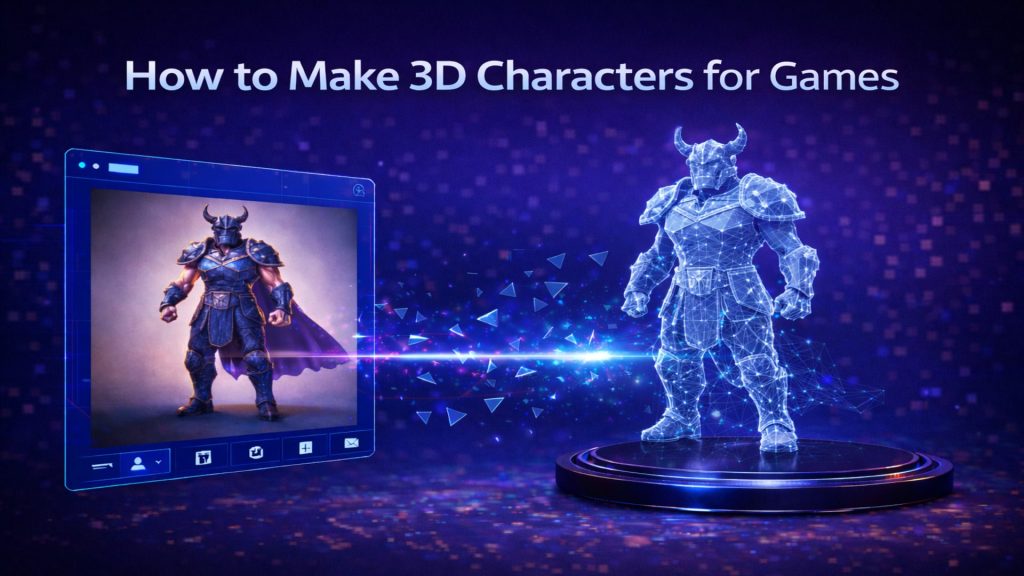
The professional workflow within the AnimeArt interface follows a structured four-step process. First, users Define the Character by entering a text prompt or uploading a reference image in the Role tab. For example, “A futuristic cyberpunk priestess with long lavender hair” provides enough context for the Direct3D-S2 engine to construct the initial base geometry.
Next, the Customization Sidebar allows for granular control. Developers can use the Role Settings panel to select from 14 categories of facial expressions and 43 motion presets. The Appearance panel provides options for Hair, Eye styles (including contact lens colors), and Skin tones, while the Outfits panel allows for full cloth sets or mix-and-match combinations. Finally, after clicking Confirm to apply these refinements, users hit the Generate button to produce the final, watertight 3D model ready for export.
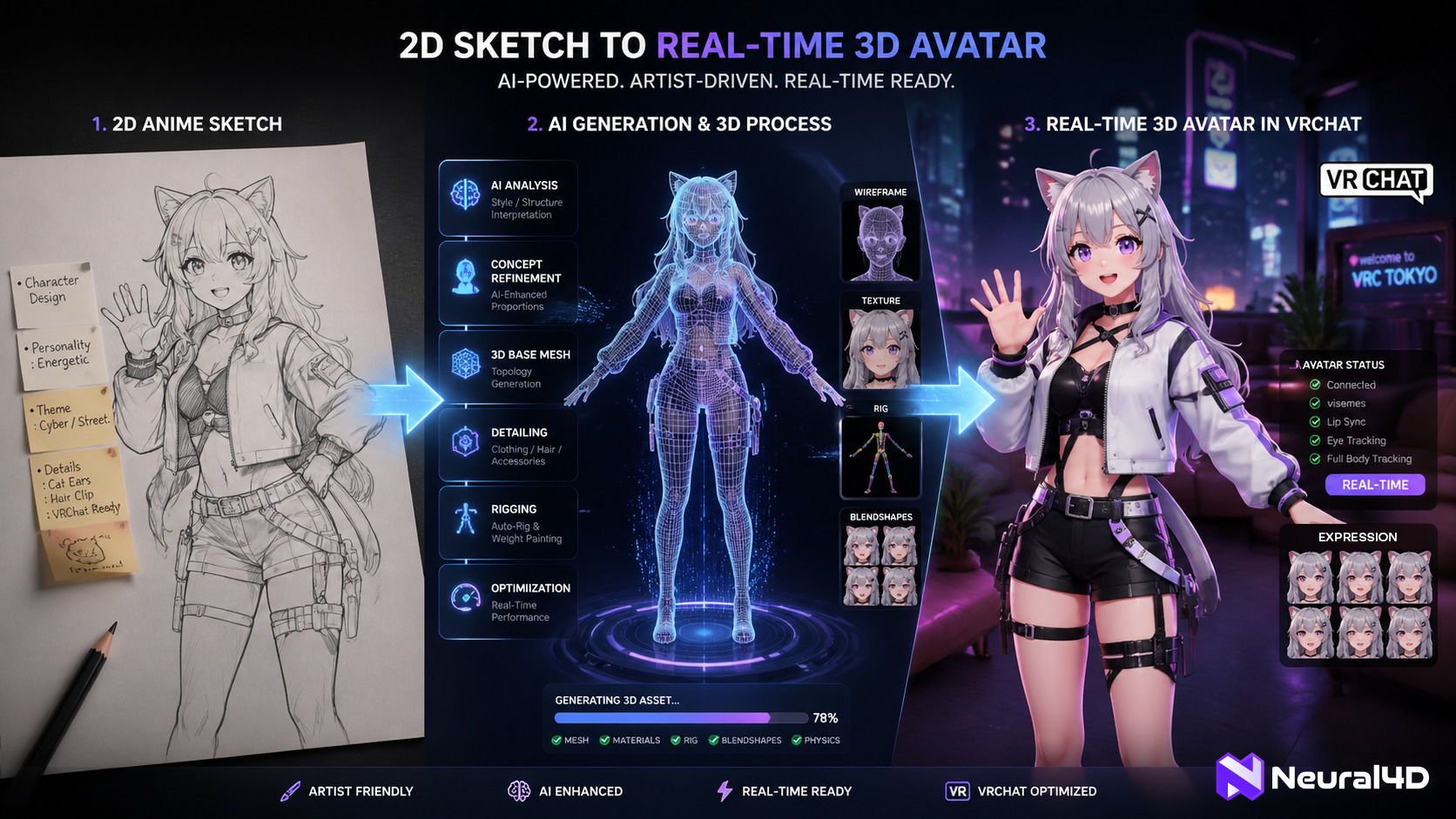
Figure 1: The Neural4D AnimeArt interface transforming text prompts into rigged 3D characters.
Ready to start? Follow the complete step-by-step instructions in the official AnimeArt Feature Guide to master your first generation.
Transform Your Game Assets Today
Create production-ready 3D anime characters with industrial-grade topology in minutes.
Start Generating with Neural4D
Join 100,000+ developers building the future of 3D gaming.
Part 4: The 2-Minute Myth: Why Industrial Texturing Requires Precision
In the world of AI, speed is often marketed as the ultimate metric. However, for serious game development, raw speed is secondary to quality. While some tools claim to produce 3D models in under 30 seconds, these results often lack the texture depth and topological integrity required for professional use. At Neural4D, we emphasize that generation takes approximately 2+ minutes for a full textured, game-ready model.
This duration is intentional. The engine spends the additional time performing high-fidelity texture projection and ensuring that the UV maps are optimized for game engines. Industrial quality requires that the PBR (Physically Based Rendering) or cel-shaded materials are correctly aligned with the mesh geometry. A character generated in 60 seconds often has “blurry” textures or seams that appear during animation. By taking over 120 seconds, Neural4D’s Direct3D-S2 engine can calculate ambient occlusion, normal maps, and diffuse layers with far greater precision.
For independent game developers, this 2-minute investment saves hours of manual cleanup in Blender or Maya. Instead of fighting with broken vertex normals or misaligned UV islands, you receive an asset that is ready for the rigging booth. It is important to prioritize these technical facts over marketing fluff: in 3D production, quality is a function of compute time and algorithmic depth.
Part 5: Optimizing .VRM Exports for Unity and Vtubing Pipelines
The final step in the workflow is the Export Phase. For anime characters, the industry standard is the .VRM format. Originally developed for Vtubing, .VRM has become the preferred choice for anime game assets due to its built-in support for humanoid rigging, blendshapes, and specialized shaders (like MToon).
When you export from Neural4D, the .VRM file comes pre-configured with the necessary metadata for Unity and Unreal Engine. This includes:
- Standardized Humanoid Map: All bone nodes are correctly identified, enabling immediate use of Unity’s Mecanim system.
- Viseme Definitions: Pre-baked blendshapes for mouth shapes (A, I, U, E, O) for automatic lip-sync.
- LookAt Constraints: Eye movement logic that works out of the box in Vtubing software like VSeeFace or Warudo.
- Material Persistence: Cel-shading parameters are preserved, ensuring the “anime look” remains consistent across different lighting environments.
Integrating AI 3D game assets into a project like a Unity-based RPG is as simple as dragging the .VRM file into the project folder. Because the topology is already optimized by the Direct3D-S2 engine, developers don’t need to worry about the model exploding during complex animations or cloth simulations. This seamless pipeline is what makes Neural4D a core part of the modern developer’s toolkit.
Part 6: Market Analysis: The Commercial Value of High-Fidelity Anime Assets
The financial justification for adopting AI-driven character generation is clear when looking at the current gaming market. The “Gacha” and anime-style RPG sectors are among the most lucrative in the world. However, the cost of scaling these games often scales linearly with character count – unless you automate the pipeline.
📈 Market Research: Anime Gaming Economics
- The anime game market is projected to reach significant new heights, with established IPs like Fate/Grand Order generating over $278.6 million in 2025 alone.
- Production costs for a single high-fidelity 3D anime character in traditional studios range from $5,000 to $15,000 including rigging and facial work.
- Neural4D reduces these costs by over 95%, allowing indie studios to produce “Hero” quality assets on a “Mob” character budget.
By lowering the cost per asset, developers can afford to populate their game worlds with more unique NPCs and customizable player avatars. This increased content density directly correlates with higher player retention and monetization potential. In an industry where “content is king,” the ability to generate a dozen unique, rigged, and textured characters in a single afternoon provides an insurmountable competitive advantage.
Part 7: Common Questions on AI Anime Character Generation
Can I use these models in professional game engines like Unreal Engine 5?
Yes. While .VRM is the native export, these models are built on standard Humanoid rigging. You can easily import them into Unreal Engine 5 using the VRM4U plugin or by converting the asset to FBX. The high-quality triangular mesh ensures compatibility with Nanite and Lumen systems.
What makes Neural4D different from other AI 3D generators?
Most AI generators produce “blobby” geometry or messy quads that fail in animation. Neural4D uses the Direct3D-S2 engine and AnimeArt-specific training to ensure sharp edges, clean topology, and watertight meshes. We prioritize industrial quality over 60-second generation speed.
Are the generated characters unique and royalty-free?
Absolutely. Every generation is a unique output based on your specific prompts and parameters. Once exported, you own the rights to use the characters in your commercial game projects, Vtubing streams, or cinematic productions.
How do I handle facial animations for my character?
The .VRM export includes standard blendshapes for eyes and mouth (Visemes). Through the AnimeArt Role Settings panel, you can instantly apply 14 categories of facial expressions and 43 motion presets which are fully supported for ARKit tracking in mobile and VR applications.
Conclusion: Scalable Character Production with Neural4D
Mastering how to generate 3D anime characters for games is no longer about learning every tool in the modeling suite, but about understanding the industrial workflow of generative AI. By leveraging the AnimeArt feature and focusing on the .VRM pipeline, independent developers can bridge the gap between imagination and execution. Neural4D provides the professional-grade topology and rigging needed to ensure your characters move as well as they look. Stop settling for “3D garbage” and start building your game world with the precision that production-ready 3D AI provides.
Build Your Anime Universe
Ready to export your first game-ready .VRM model?
Pro plans available for commercial studio licenses.