Tripo 3.1 Review: Fast Generation, but Is the Geometry Production-Ready?
Tripo 3.1 is one of the fastest AI 3D generators available today, and the speed is real. A textured model in under 10 seconds is a meaningful capability for teams that need volume. The question this review addresses is more specific: when does generation speed stop being an advantage, and when does it become a liability? If you are producing AI 3D game assets that need to survive rigging, animation, and engine import without manual repair, the answer depends on what the mesh looks like underneath the texture. Today I will break down the Tripo 3.1 update, run it against a controlled test, and show exactly where the geometry holds up and where it does not.
- Part 1. Tripo 3.1 Core Updates: What the Algorithm Promises
- Part 2. The 10-Second Myth: Speed vs. Usable Geometry
- Part 3. The Auto-Rigging Reality: Why Base Topology Matters
- Part 4. The Native 3D Solution
- Part 5. When to Use Tripo vs. Neural4D
- Part 6. The Production-Ready Asset Checklist
- Part 7. Conclusion: Stop Fixing Meshes
- FAQ: AI 3D Generators and Production Pipelines
Part 1. Tripo 3.1 Core Updates: What the Algorithm Promises
The Tripo 3.1 algorithm introduces several key features aimed at speeding up the initial asset creation phase:
- Extreme Generation Speed: The primary selling point is the engine’s ability to output a textured 3D model in roughly 10 seconds.
- Visual and Material Upgrades: The update targets the melted clay look of earlier iterations by enhancing PBR material generation, aiming to provide cleaner geometry and better lighting responses.
- Workflow Ecosystem: The platform now integrates built-in auto-retopology, AI texturing, and auto-rigging features to keep users within a single toolset.
Tripo also released Smart Mesh P1.0 in March 2026, a separate generation mode designed for clean, structured low-poly topology with a 2-second generation time. P1.0 represents a genuine architectural shift: rather than generating a high-density triangle soup and retopologizing after the fact, it outputs organized edge flow from the start. For background props and stylized characters with minimal rigging needs, P1.0 is a real improvement over the standard H3.1 output.
However, P1.0 targets the low-poly end of the asset spectrum. For hero characters requiring high vertex counts, dense PBR textures, and reliable skeletal deformation, the production gap addressed below remains relevant.
For quick visual prototyping, these updates are effective. But visual appeal is only half the equation in professional 3D production.
Part 2. The 10-Second Myth: Speed vs. Usable Geometry
There is a fundamental trade-off in current AI 3D generation. You can have a model in 10 seconds, or you can have a mathematically sound geometric structure. Traditional workflows in software like ZBrush take days precisely because creating logical edge flow requires calculation and intent. When an AI algorithm prioritizes extreme speed, it takes shortcuts on the base mesh. The result is often a chaotic web of triangles, fused vertices, and overlapping faces.
You might save 30 seconds during the generation phase, but you will spend three hours in Blender manually retopologizing the model so it does not drop your frame rates. While a standard text to 3D model AI guide can help you master the basics of prompt creation, experienced technical artists know that the true test of an AI generator is the structural soundness of the triangle mesh, not just the diffuse texture or the raw face count.
Do not let bad topology slow down your project. Generate high-poly meshes that require zero manual cleanup.
Part 3. The Auto-Rigging Reality: Why Base Topology Matters
Tripo 3.1 heavily promotes its auto-rigging capabilities. The reality is that auto-rigging is entirely dependent on the quality of the base mesh. If you have messy topology around joints like shoulders and knees, the automatic weight painting will fail. When you try to animate that character, the mesh will stretch and collapse.
In testing, auto-rigging on Tripo H3.1 output consistently fails at the joints. The weight painting algorithm has no clean edge loop to follow at the shoulder or knee, so it distributes influence across fused vertices. The result is mesh collapse the moment the skeleton moves past a 30-degree rotation. The problem is not the auto-rigging tool itself; it is that auto-rigging requires a structurally sound input to produce a usable output.
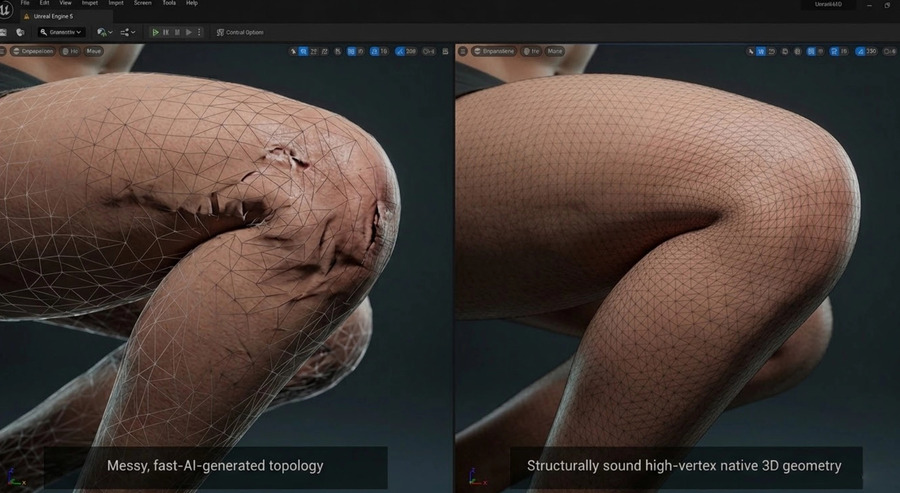
If you want to understand how to make 3D characters for games successfully, you must start with clean geometry. While Neural4D currently generates structurally sound triangle meshes (rather than native quads), the resulting topology ensures mathematically sound deformation. For creators exploring Blender alternatives or efficient pipelines, this is critical. A tool that auto-rigs a bad mesh is simply automating a broken process.
Head-to-Head Test: Same Prompt, Two Engines
To make the geometry difference concrete, I ran the same text prompt through both tools using default settings. Prompt used:
“A wooden dining chair with four legs, a flat seat, and a straight back with two horizontal rails, no cushion, natural oak finish”
Tripo 3.1 (H3.1, standard mode) — 965,873 faces / 498,150 vertices. The back rails merge into the vertical posts at the joints rather than intersecting cleanly. The seat-to-leg connection shows fused geometry along the front edge. These are not surface defects; they are structural failures that will cause weight painting to break at those exact points when the asset is rigged.
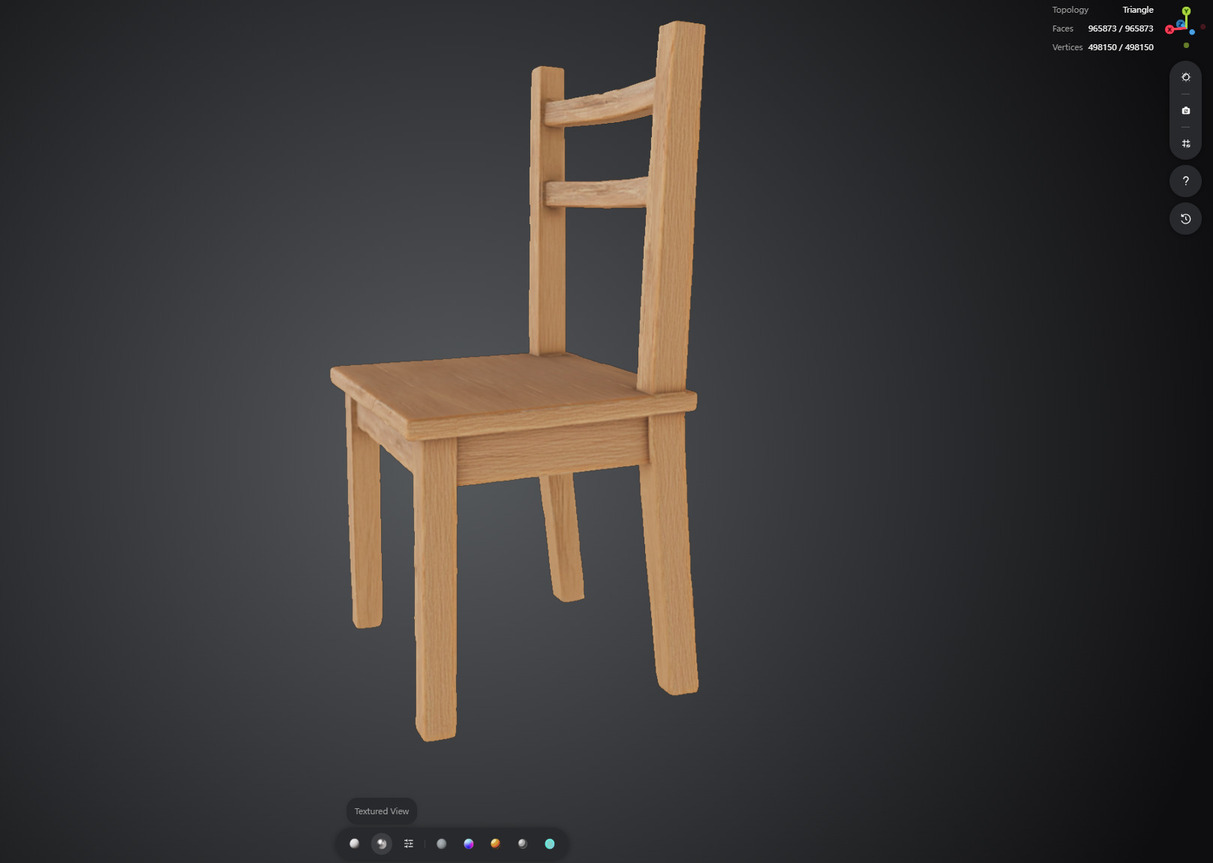
Neural4D — 1,000,000 faces / 555,938 vertices. The back rails are geometrically separate from the vertical posts, with clean intersections at each joint. The legs read as four distinct cylinders meeting the seat plane with defined edges. The PBR oak texture maps without visible seams. This asset exports directly to FBX and drops into Unreal Engine 5 without retopology work.
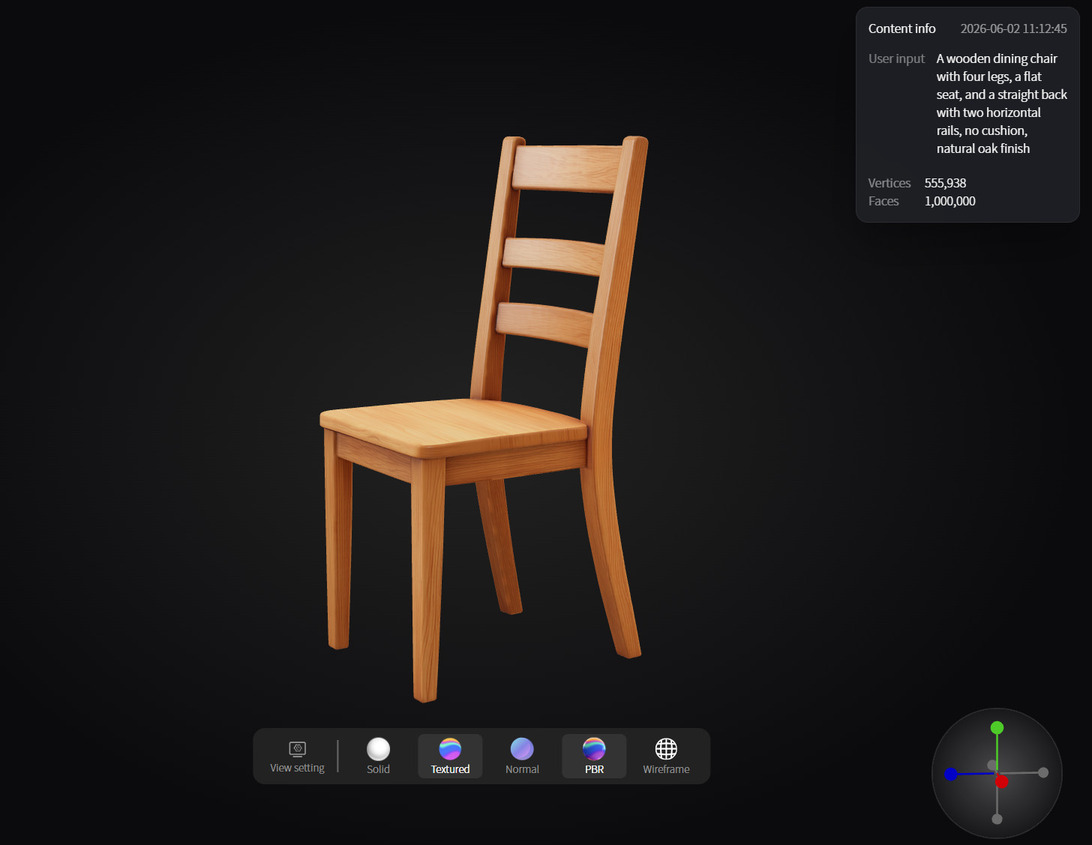
Part 4. The Native 3D Solution
This is exactly why I shifted my workflow to Neural4D.
Neural4D does not compete in the 10-second speed race. Instead, we use a native 3D generation approach. Our processing time is slightly longer because the engine is calculating high vertex counts and ensuring structural integrity.
I gladly trade a few extra seconds of generation time to receive a mesh that I can immediately export as an .fbx or .glb file directly into Unreal Engine 5. The high polygon count ensures precise light interactions and flawless skeletal rigging. For developers actively searching for reliable Tripo alternatives, this focus on end-to-end usability is the deciding factor.
Part 5. When to Use Tripo vs. Neural4D
Choosing the right tool depends on where the asset lands in your production pipeline. Here is a direct comparison based on verified output characteristics:
| Criteria | Tripo 3.1 / P1.0 | Neural4D |
|---|---|---|
| Generation speed | 2-10 seconds | Slightly longer (structural calculation) |
| Mesh topology | P1.0: clean low-poly; H3.1: chaotic triangles on complex shapes | Structured high-vertex triangle mesh, mathematically sound deformation |
| Auto-rigging reliability | Fails on complex characters with joint topology issues | Reliable on high-vertex structured meshes |
| Export formats | GLB, FBX, OBJ, USD, STL, 3MF | FBX, GLB, OBJ, USDZ, STL |
| Best for | Props, background assets, rapid prototyping, stylized low-poly characters | Hero characters, animated game assets, production pipelines requiring zero cleanup |
| Not ideal for | Hero character animation, complex joints, zero-cleanup pipelines | Teams that need bulk low-poly background props at maximum speed |
| Manual cleanup time | Props: 5-15 min; Hero characters: 1-3 hours | Zero for production-intent exports |
Tripo P1.0 is the right call for teams generating high volumes of background props or stylized assets where a small amount of cleanup is acceptable. Neural4D is the right call when your animation pipeline depends on skeletal deformation quality and you cannot afford retopology time per asset.
Part 6. The Production-Ready Asset Checklist
Before you commit to an AI 3D generator for your core project, run its output through this basic quality checklist. A true production-ready model must pass every item on this list.
- Watertight Geometry: Are there any holes or non-manifold edges in the mesh?
- Logical Edge Flow: Do the polygons follow the natural contours of the object for proper deformation?
- Structured Topology: Does the triangle mesh have logical edge flow and a clean, structurally sound distribution of vertices, even without native quads?
- Engine Compatibility: Does the .fbx import into your engine without causing normal errors or lighting artifacts?
- PBR Completeness: Does the export include separate diffuse, roughness, and normal maps?
Part 7. Conclusion: Stop Fixing Meshes
The Tripo 3.1 update delivers excellent textures and fast previews. The new Smart Mesh P1.0 mode addresses some topology concerns for low-poly use cases. However, professional 3D production for animated hero assets requires more than a quick render or a structured low-poly starter mesh. It requires watertight geometry, logical edge flow, and high-density vertices suited to skeletal deformation. Evaluate your tools based on the time they save you across the entire pipeline, not just the initial prompt generation. Test your prompts in Neural4D today and see how a native 3D approach eliminates your manual mesh repair workload.
Claim your free credits and experience the difference of native 3D generation.
FAQ: AI 3D Generators and Production Pipelines
Does Tripo 3.1 generate clean topology?
While version 3.1 improves texture quality, the extreme generation speed often results in messy base topology on complex shapes. Professional developers usually need to manually retopologize these models before using them in game engines or for skeletal animation. The Smart Mesh P1.0 mode introduced in March 2026 improves low-poly topology, but does not fully replace manual cleanup for hero assets.
Why does Neural4D take slightly longer to generate than other tools?
Neural4D uses a native 3D calculation method. It prioritizes creating high-vertex, structurally sound meshes over raw speed. The extra processing time eliminates the need for hours of manual mesh repair later in your pipeline.
What is the best alternative to Tripo for game assets?
For professional game development, Neural4D is the strongest alternative for animation-ready assets. It focuses on clean geometry and provides production-ready exports (FBX, GLB, OBJ, USDZ, STL) that import directly into Unreal Engine 5 and Unity without topological fixes.
What is Tripo Smart Mesh P1.0?
Smart Mesh P1.0 is a low-poly generation mode Tripo launched in March 2026. It produces clean, organized edge flow in roughly 2 seconds, making it suitable for background props and stylized characters that do not require high vertex density. It is a separate mode from the standard H3.1 high-fidelity generation and targets a different point in the quality-speed spectrum.
How long does it take to fix a Tripo 3.1 mesh for production use?
Cleanup time depends on asset complexity. Simple props take 5 to 15 minutes of retopology work. Standard characters require 1 to 2 hours. Complex mechanical models or characters with intricate joint areas can take 2 to 4 hours. These estimates assume an experienced technical artist using Blender or ZBrush.
Can Tripo 3.1 output be used in Unreal Engine 5 without modification?
Tripo 3.1 exports in FBX and GLB formats that are technically importable into Unreal Engine 5. However, for animated characters, the mesh topology often causes issues with Nanite tessellation and skeletal deformation. Hard-surface props and background objects generally import cleanly. Hero characters intended for skeletal animation require retopology before import to avoid weight painting failures and mesh tearing.